

- TRIBE v2 combines three ready-made models (V-JEPA 2, w2v-BERT 2.0 and Llama 3.2 3B) to predict the cortex's response to a video.
- Its non-commercial CC BY-NC 4.0 licence rules it out of my reel studio.
- On a 32 GB Mac mini the video part wanted 12 GB for one calculation and without it ran only with swap.
In the fifteenth part I take the strangest model I have on my disk. Meta’s TRIBE v2 does not write, draw or talk. It predicts how the brain of an average person watching a film would respond: which areas of the brain would be more active in a given second. I downloaded it into my reel studio out of curiosity, to see whether such a signal would help in rating the first seconds of a reel, and I rejected it because of its licence. Now, in a non-commercial test, I check whether it can run on a Mac mini M6 with 32 GB. I will say it now: not quite, and that is exactly why this part teaches more than a pretty brain map.
What a brain encoding model is
An fMRI scan measures changes in blood flow in the brain that come with the work of nerve cells. For years scientists have collected fMRI recordings of people watching films, listening to podcasts and reading text. A brain encoding model learns from such data: it gets a film, sound or text and predicts what the fMRI signal would look like.
According to the model card, TRIBE v2 combines three ready-made models that turn data into numbers:
- Llama 3.2 3B for text,
- V-JEPA 2 for the picture,
- w2v-BERT 2.0 for sound.
On top of them sits a fourth part that turns these numbers into the activity of about 20,000 points of the cerebral cortex on a standard mesh (fsaverage5). The results are for an “average” study participant. According to the repository’s description, they are shifted 5 seconds back, because blood flow responds with a delay. The authors’ paper describes the details.
| Role | Other use on my disk | |
|---|---|---|
| V-JEPA 2 ViT-g | picture and motion turned into numbers | motion analysis in reels (part 12) |
| w2v-BERT 2.0 | sound and speech turned into numbers | TRIBE v2 only |
| Llama 3.2 3B | text turned into numbers (words from the transcript) | small model test (part 14) |
| TRIBE prediction part | numbers → cortical activity | – |
What is interesting is that I had two of the three encoders on disk for other reasons anyway. V-JEPA 2 analyses motion in my reels, which I write about in the part on image models, and Llama 3.2 3B was the star of the previous part.
Why I rejected it
The idea was tempting: if the model predicts which brain areas respond to the first seconds of a reel, maybe that could become a measure of “how strong the start of a reel is”. Before adding it to the studio, though, I read the licence. TRIBE v2 has the CC BY-NC 4.0 licence (full text), which allows only non-commercial use. My reel studio is for making content for a brand, so using the model to rate reels would be commercial use. In the studio documentation I wrote plainly that TRIBE v2 is not used.
There is a second reason too. The model predicts the cortical activity of an average person in study conditions, not whether someone scrolls past a reel on a phone. Even if the licence allowed it, the link between these numbers and reel results would still have to be proven on data.
So this test is purely a non-commercial check: does the model run on a Mac, how long does it take and what does the result look like. I do not use it in any product.
What I measure and how
| Mac mini M6 (Mac18,5) | |
|---|---|
| Processor | Apple M6, 12 CPU cores: 2 Super, 4 Performance, 6 Efficiency |
| Graphics | 12 GPU cores, Metal 4 |
| Memory | 32 GB shared by the processor and graphics, 170 GB/s bandwidth |
| Storage | 512 GB SSD (494 GB formatted) |
| System | macOS 27.0.1 |
I run the code from the TRIBE v2 repository in a separate Python environment, with a few of my own fixes for macOS: a different device for the calculations, the setting num_workers=0 and WhisperX in int8 on the processor.
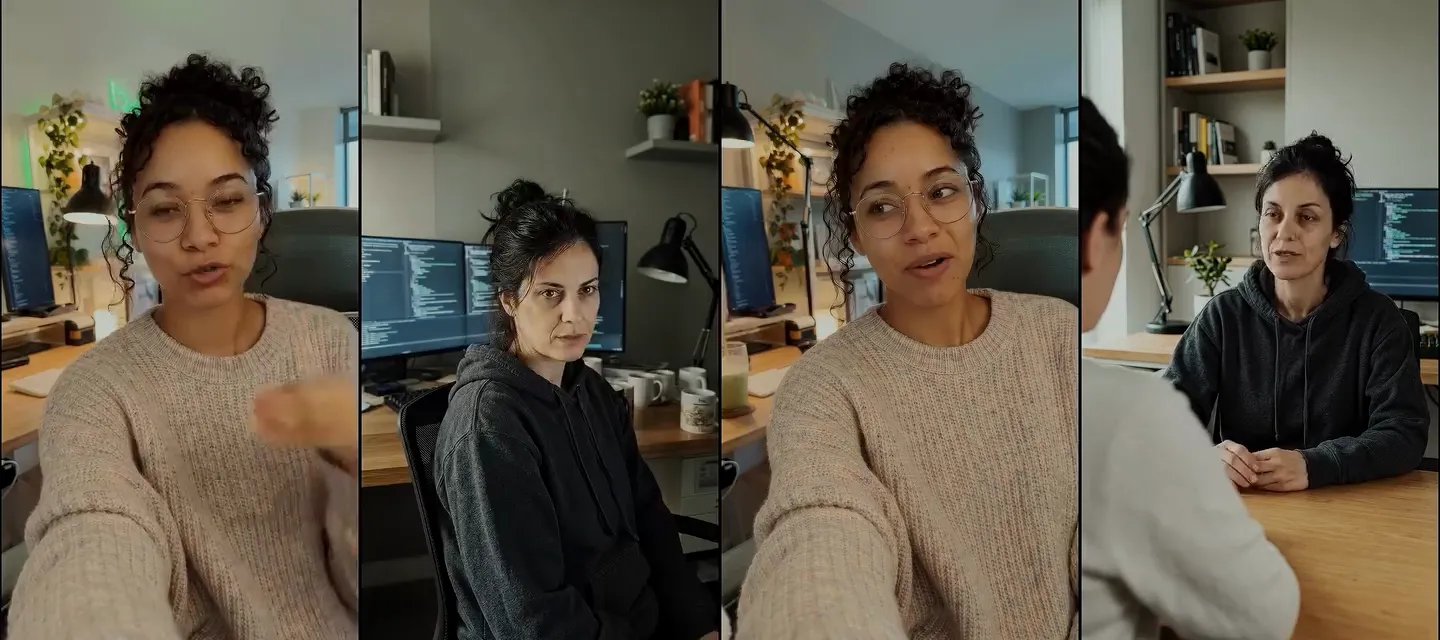
The input is a reel from my channel (26 s, speech in Polish). It is a test clip from my project with UGC video created by AI: I generated the characters and the whole video in Google Veo 3.1.
I measure each stage separately:
- turning speech into words (WhisperX),
- the text encoder (Llama),
- the sound encoder (w2v-BERT),
- the image encoder (V-JEPA 2),
- and finally the actual result was to come.
The official code has the transcription language set permanently to English. It also supports French, Spanish, Dutch and Chinese, but not Polish. I added a TRIBE_LANGUAGE variable, but in the measurement I kept English, as in the official example. So WhisperX writes Polish speech as English words, and the numbers from the text do not match what is said in the reel.
The Hugging Face settings point the encoders at NVIDIA cards (CUDA), and the neuralset library does not accept the Mac’s graphics chip (MPS). That is why I set the device in my script, skipping that check.
Results: three attempts and no map
Processor (my fix) Graphics chip, memory not freed Graphics chip, in turn, no predictor Words from speech (WhisperX) 519 s from cache from cache Text: Llama 3.2 3B 447 s about 10 s 6.5 s Sound: w2v-BERT 2.0 6 s about 3 s 2.3 s Video: V-JEPA 2, 52 windows 98 s per window (with predictor), about 85 min (estimate from 19 windows) out of memory after 202 s 80 s first window, then 110–147 s; about 115 min (estimate from 7 windows) Memory no problem the predictor wanted 12 GB at once swap 14.8 of 16 GB Result stopped after 50 min error stopped after 15 min
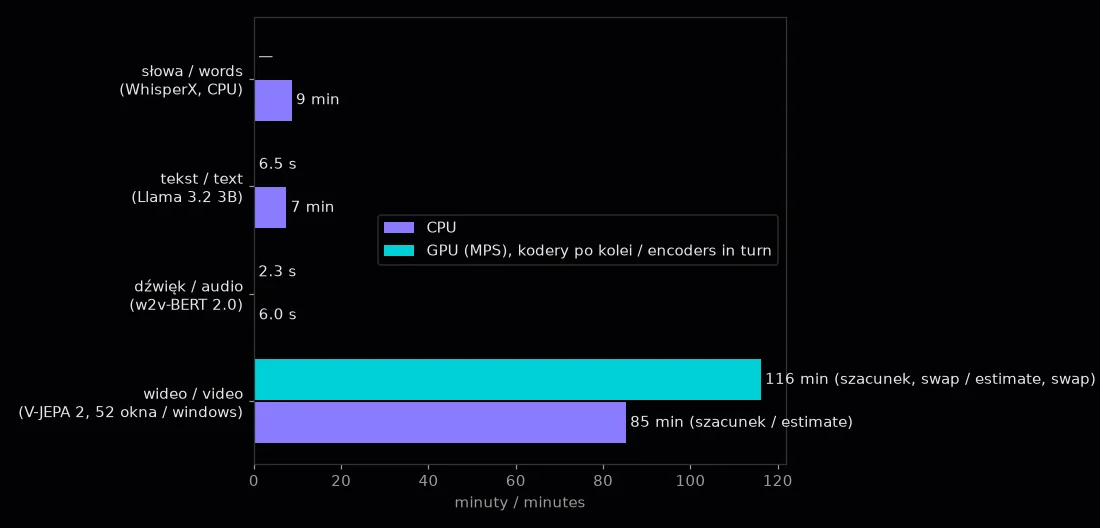
First attempt: the processor. The settings point the encoders at NVIDIA cards, so I switched them to the processor. Turning speech into words took 519 s, text through Llama 447 s, and sound 6 s. The video encoder took 98 s for each of the 52 video windows. A window is 4 s and 64 frames, and a new one starts every half second. After 19 windows and 50 minutes I stopped the run. The whole thing would take about 1.7 hours for 26 seconds of video, 1.4 hours of it the video encoder alone.
Second attempt: the graphics chip, encoders in turn. TRIBE’s code frees memory after each encoder only on NVIDIA cards. On the Mac 23 GB of data stayed in memory, including what Llama and w2v-BERT left behind, and V-JEPA 2 reported running out of memory after 202 s. I added freeing of the Mac’s graphics memory, but the error came back, again when trying to take 12 GB.
Third attempt: the graphics chip without the predictor. The predictor is the part of V-JEPA 2 that TRIBE does not use anyway, so I turned it off. Text and sound then took 6.5 and 2.3 s, and text alone was about 70 times faster than on the processor. The video encoder did not report an error, but the system wrote 14.8 of 16 GB of swap. The first window took 80 s, and the next ones, as swap filled up, 110–147 s (135 s on average). That is longer than on the processor, even though the predictor still ran there. I stopped after 7 windows.
Why V-JEPA 2 does not fit
The model itself is not large: it has about a billion parameters, 4 GB at full precision. The problem is the input data.
TRIBE gives the model 64 frames of 256 pixels. The encoder cuts the picture into 16 × 16 pixel squares and joins two frames at a time, so it sees 32 × 256 = 8,192 tokens at once. Attention compares every token with every other one, so memory grows with the square of the number of tokens.
Let us work it out:
- the encoder has 22 attention heads, and each number takes 4 bytes, so one attention table is 22 × 8192² × 4 B, about 5.9 GB,
- the 12 GB in the errors, though, is the predictor: it has 12 heads and handles 8,192 input tokens plus 8,192 to predict, so 12 × 16,384² × 4 B, about 12.9 GB at once. That is 12 GiB, exactly what the error message gave.
Without the predictor the encoder fitted, but together with the model itself, the results of all 40 layers and the rest of the system it pushed data into swap.
Why swap and not an error? PyTorch lets the Mac’s graphics chip take 1.7 times more memory than Metal recommends for this computer (described in the PyTorch documentation). On my Mac that is 42.4 GiB with 32 GB of physical memory. I would not set PYTORCH_MPS_HIGH_WATERMARK_RATIO=0.0, which the error message suggests, because that removes the limit and risks freezing the system.
In my studio from part 12 the same model gets 20 frames, 2,560 tokens, computes in half precision, and one clip takes about 0.7 s.
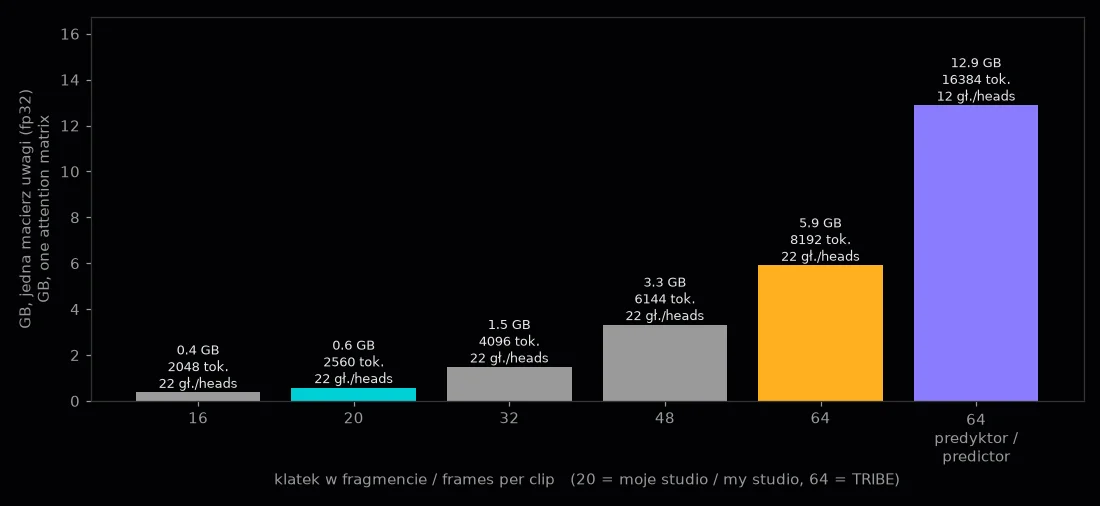
On NVIDIA cards PyTorch uses methods that compute attention in pieces: FlashAttention (the authors’ paper) in the fp16 and bf16 formats, and a memory-saving version in fp32. The PyTorch documentation says that on other devices the plain version runs, and in PyTorch 2.6 that builds the whole table at once on a Mac.
Two things would help: computing the encoder in half precision (about 3 GB instead of 5.9 GB per table), or splitting attention into pieces in the model’s code. Fewer frames are not an option, because TRIBE was trained on data from 64 frames.
It is a good general lesson: whether a model fits in memory depends not only on the size of its file. It also depends on the length of the input data and on which parts of the model you actually run.
How to read a result like this
If you run TRIBE on a stronger computer, you get a brain map with coloured blobs. It looks convincing, which makes it easy to read too much into it. I stick to a few rules:
- it is a prediction for an average study participant, not a measurement of a specific person,
- more activity in the areas for vision with a fast picture, or in the areas for hearing with speech, is expected and says nothing about the quality of the content on its own,
- it only makes sense to compare materials under the same conditions: of the same length, in the same format, with the same settings.
The question “will people watch my reel to the end” is better answered by app statistics than by a brain model. I write more about reading AI research papers and what not to take from them in my article on reading AI papers.
Local or API
TRIBE v2 is not available as a paid cloud service. Meta offers a demo version in the browser, but to get numbers for your own material you have to run the model yourself. It is a good example of a model that exists only for running on your own computer and only for research. The cost is the Mac’s working time and disk space for three encoders: about 32 GB of 494 GB.
How to run TRIBE v2 on a Mac
The model has no convenient installer, so I describe the route I took. The code comes from the official repository and is installed in editable mode in a separate Python environment. Drawing the cortical map needs extra packages, which the repository lists in its version with visualisation.
TRIBE v2 on a Mac step by step
- 01A separate environmentPython 3.11 or newer, the repository installed in editable mode, optionally with packages for charts.
- 02Access to LlamaThe text encoder is Llama 3.2 3B, whose files require accepting a licence on Hugging Face.
- 03Encoder filesV-JEPA 2, w2v-BERT 2.0 and Llama download on the first run; together with TRIBE they take about 32 GB on my disk, 16.5 GB of it V-JEPA 2's original file (original/model.pth), which the transformers library does not use.
- 04DeviceThe settings point the encoders at NVIDIA cards. On a Mac I change the device in code, set PYTORCH_ENABLE_MPS_FALLBACK=1 and num_workers=0.
- 05MemoryAfter each encoder I free the graphics chip's memory (torch.mps.empty_cache), and I run V-JEPA 2 with the setting skip_predictor=True (described in the transformers documentation), because TRIBE needs only the encoder's results.
- 06InputA path to a video, sound or text; the model builds a timeline of events from it by itself.
Turning the video into numbers through V-JEPA 2 takes the longest: in my attempts it decided everything, while text and sound on the graphics chip took a few seconds. So it is worth saving the encoders’ results to disk, because in later attempts on the same material this saves most of the time.
The result is a table: one row for each second of the recording and one column for each of about 20,000 cortical points. From such a table you can compute averages for brain areas, compare parts of a recording or draw maps. Just remember that these are data from a model, not from a scan of a real person, and that the licence does not allow using them in a commercial product.
Verdict
TRIBE v2 is a fascinating research tool and a good example of how big models become building blocks for other models: here three ready-made encoders feed a fourth part. On a 32 GB Mac mini, though, it is a model at the limit of what is possible:
- text and sound take a few seconds,
- the video encoder fits only at the cost of swap (14.8 of 16 GB),
- the whole thing needs either the processor and about 1.7 hours, or a stronger computer.
I have not yet tried the processor without the predictor. It is the most promising option on 32 GB. I do not use this model in my reel studio because of its licence and the lack of evidence that it predicts what I care about. It stays on disk for non-commercial tries, ideally on short clips or with the video encoder in half precision (which I have not tested either).
Tomorrow brings the last part of the series: all the models on one Mac mini, in one overview.