


- Stable Audio Open turns a text description into a few seconds of 44.1 kHz stereo sound: a transition whoosh, an impact, forest sounds.
- I make three versions, and CLAP picks the one that best matches the description.
- The model is free for creators with revenue under USD 1M a year, and a paid service costs cents per sound.
In the eighth part of the series I leave the picture and move to sound. A reel without effects sounds flat: a cut without a transition whoosh, a title card without a light impact, a forest scene without birds. Stable Audio Open is an open model that turns a text description into a few seconds of sound. I used it in my animated reel Few Summers for effects (footsteps on a wooden footbridge, an axe hit, children laughing) and a piano bed, and the CLAP model picked the best version for me. The sounds of the surroundings there came from field recordings in the Sonniss GDC packs, which can be used free of charge. I test this on a Mac mini M6 with 32 GB.
Where to get sound effects
I have three sources of effects:
- Ready-made libraries under the CC0 licence. From them I built an effects kit for my reel template: a few transition whooshes, impacts, rising sounds and clicks from Freesound and Kenney.
- Sounds computed directly in code. This is how, for example, server hum or keyboard tapping is made.
- A model that creates sound from a description. It makes sounds no library has, for example “calm night forest with a soft wind and distant crickets” or “fast cinematic transition whoosh, no music”.
The CC0 licence means the author has given up their rights, so I can use such sounds in reels without crediting the author.
| CC0 library | Sound from code | Stable Audio Open | |
|---|---|---|---|
| Where from | Freesound, Kenney | code (a signal generator) | a model from a text description |
| Predictability | high | full | variable, several versions |
| Preparation time | searching and listening | writing code | about 2 min per version (Mac mini M6) |
| Licence | CC0 (no credit needed) | mine | Community: free up to USD 1M revenue |
| Best for | whooshes, impacts, clicks | server hum, tapping | short effects no library has (footsteps on a footbridge, an axe, children laughing) |
Stable Audio Open took the place of that third source in my project. According to the authors’ paper, it is an open model that turns text into 44.1 kHz stereo sound and was trained on recordings under Creative Commons licences. It is a diffusion model: it starts from noise and step by step arrives at a sound matching the description. The model file takes about 5 GB, and the model runs in the diffusers library on the Mac’s graphics chip.
How I made sounds in Few Summers
Few Summers is a short animated story in which every scene has its own background sound. The settings that stayed until the final version:
My process for making an effect
- 01Description in EnglishWhat it should sound like, what character it should have and what must not be there (no music, no speech).
- 02Negative promptLow quality, distortion, noise, clipping, speech.
- 03Two versions (three in the test)70 steps for effects, 100 for the music bed.
- 04CLAP scoreEach version gets a score for how well it matches the description.
- 05Keep or rejectThe best one stays; below 0.20 a second batch with "clean, natural, realistic" added, and then the effect is dropped.
The negative prompt is a second part of the instruction in which I list what must not be in the sound. The model then tries to avoid these qualities.
One thing needed a code fix. The sampler, the part of the model that decides how to remove noise in the following steps, looped at the last step. It came from a library diffusers relies on. I replaced its source of randomness with plain noise from a fixed random seed. For this sampler that is an equally valid source of randomness, and it gives repeatable results too. Since then making sounds has worked stably.
CLAP as the judge
CLAP is a model that turns sound and text into numbers in the same space. The closer they are, the better the sound matches the description. It is a good automatic judge: I do not have to listen to dozens of versions, because the model points to a candidate and I only listen to the chosen one.
In an early run of the project, the match score for birds in the forest was 0.251, above my 0.20 threshold. The project compared the sound with a short label and this test with a full description, so these numbers are not worth comparing.
Keep in mind that CLAP judges the match with the description, not the quality of the recording. A crackly sound can get a high score if it sounds “very much like a forest”. That is why CLAP filters the versions, but I make the final decision by listening.
What I measure and how
| Mac mini M6 (Mac18,5) | |
|---|---|
| Processor | Apple M6, 12 CPU cores: 2 Super, 4 Performance, 6 Efficiency |
| Graphics | 12 GPU cores, Metal 4 |
| Memory | 32 GB shared by the processor and graphics, 170 GB/s bandwidth |
| Storage | 512 GB SSD (494 GB formatted) |
| System | macOS 27.0.1 |
The test repeats the project settings on four typical descriptions for reels:
- a transition whoosh (2.5 s),
- a cinematic impact (3 s),
- keyboard typing (6 s),
- a night forest background sound (10 s).
For each description I make three versions in 70 steps, measure the time and compute the CLAP score. For the test I copy the model file from the external disk to the internal one, because models read from a USB disk could stop with an error. I take the measurement on a Mac with no other heavy programs running. I recorded a separate single run in a real Terminal window.

Results: have a listen
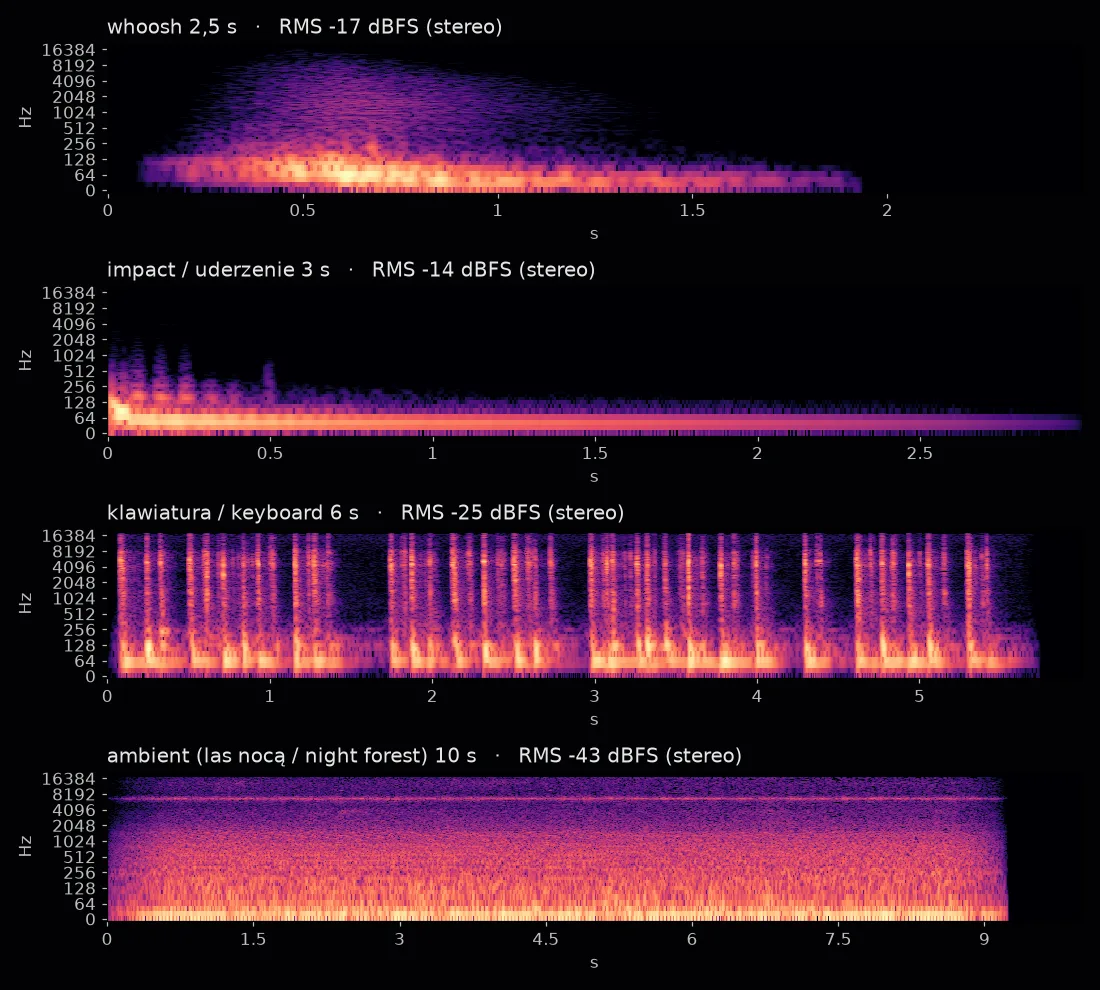
I base the description of each effect on the spectrogram and the loudness measurements of the chosen version, which you can play above. A spectrogram is a picture of sound: the horizontal axis is time, the vertical one pitch, and brightness is loudness.
Keyboard typing came out the most convincing. You can see single keystrokes in four bursts with pauses between them, just like real typing, not a uniform noise.
The transition whoosh is low rather than the “light and airy” one I asked for. Almost all its energy (97%) sits at 30–130 Hz. Higher sounds rise only between 0.3 and 1.2 s, and the whole thing fades before 2 s, although I asked for 2.5 s.
The impact has a strong start, but its decay is not short. A low sound around 50 Hz falls over 2.5 s (from −6 to −41 dBFS RMS in successive half-seconds) and is still sounding when the file ends at 3 s. That is why its end needs trimming with a fade-out.
The forest background sound is very quiet. It has an RMS of −43 dBFS in stereo, while the impact has −14 dBFS and the whoosh −17 dBFS. Almost all its energy sits below 100 Hz, and 88% even below 30 Hz, a band a phone speaker cannot play. Before raising its level I cut this rumble out with a high-pass filter around 80 Hz, as with the field recordings in Few Summers. The spectrogram also shows a thin, steady line around 6.6 kHz that can pass for the crickets in the description, although it lacks their rhythmic chirping.
Two problems affect several effects at once:
- the impact and the forest sound have channels that are partly out of phase. After combining to mono, as on a phone speaker, the impact loses 6.6 dB and the forest sound 8.1 dB. The keyboard has matching channels and loses nothing,
- three of the four effects end in silence too early: the whoosh after 1.9 s of 2.5, the keyboard after 5.7 s of 6, and the forest sound after 9.2 s of 10.
Being out of phase is a common problem with effects from the model, so I also check every effect after combining it to mono. Of the three versions CLAP picked the third for the whoosh (0.48), the second for the impact (0.38), the third for the keyboard (0.45) and the first for the forest sound (0.40). All 12 versions passed the 0.20 threshold (the lowest score was 0.27), and the differences between versions of one description were 0.04–0.11. The chosen forest sound is exactly the quiet, rumbling one, which shows that CLAP does not judge quality.
Results: time and CLAP
| 3 versions | Per 1 s of sound | CLAP of 3 versions | Picked | |
|---|---|---|---|---|
| Transition whoosh, 2.5 s | 334.8 s | 44.6 s | 0.41 / 0.37 / 0.48 | 3rd |
| Impact, 3 s | 354.1 s | 39.3 s | 0.27 / 0.38 / 0.30 | 2nd |
| Keyboard, 6 s | 356.1 s | 19.8 s | 0.39 / 0.40 / 0.45 | 3rd |
| Forest sound, 10 s | 354.3 s | 11.8 s | 0.40 / 0.36 / 0.38 | 1st |
The most important lesson from this table: time barely depends on the length of the effect. A 2.5 s whoosh and a 10 s forest sound cost the same, about 2 minutes per version. The three versions are computed together in one call, so this is an average, not the time of a single version.
I found the reason in the diffusers library code. The model always computes the full window it was built for, about 47 s of sound (the model card gives the same as the maximum). Only at the end does it crop the result to the requested length. According to the diffusers documentation, the default length is 47.55 s, and the model receives the sound’s length as separate timing information.
Short effects are therefore the most expensive per second. If you need several short sounds, it should be cheaper to generate one longer sound and cut it, although I did not measure this.
The other measurements:
- loading the model took 5.5 s, and copying the file from the external disk 6.7 s,
- the model in fp32 takes 4.9 GB, and 19.4 GB of the 32 GB was free before the test, so it fits with a wide margin,
- I did not measure the version on the processor alone.
One exception: the first batch of whoosh versions took 253 s, and all later ones 334–359 s. I do not know exactly why. My guess is that during longer work the Mac lowered the graphics chip’s clock speed.
Local or API
Stability AI offers newer audio models through an API, as a paid cloud service. According to Stability’s pricing, one credit costs USD 0.01, and one sound from Stable Audio 2.5 or 3.0 is 8 credits, so USD 0.08 per sound of up to three minutes. In ElevenLabs’ pricing, sound effects cost USD 0.12 per minute.
My four effects with three versions each would cost USD 0.96 in Stability’s API and about USD 0.13 in ElevenLabs, counting USD 0.12 per minute of sound. On the Mac, 12 versions (four descriptions, three each) come to about 23 minutes of graphics chip work in total, so a few dozen descriptions fit easily into one night.
Money is again not the main argument. What speaks for the model on your own computer is that I can generate dozens of versions overnight, filter them with CLAP and not worry about limits.
The licence is clear too. According to the Stability AI Community License:
- the model is free, including for commercial use, for individuals and companies with annual revenue below USD 1M,
- for commercial use you have to register with Stability AI,
- the threshold counts affiliated companies together,
- above the threshold you have to ask Stability for a separate licence, and the company decides whether to grant it.
The model files on Hugging Face require logging in and accepting the terms.
What to watch out for
The model does best with short, uniform sounds. In longer recordings of surroundings, the character of the sound can suddenly change halfway through. In the project I cut the calmest part out of longer library recordings: I look for the place with the most even loudness, without sudden jumps. It is worth doing the same with a longer sound from the model.
Before mixing I lower the loudest point of each effect to about −3 dBFS, because after AAC compression the keyboard typing file peaks at about +0.6 dBFS, above the level at which sound distorts.
The model does not make speech or singing well and is not meant to, which is why the negative prompt contains the words “speech, talking”. To check what is in a finished sound I also use the AST model, which I describe in a later part of this series. I write about turning speech into text on your own computer in the part on Whisper, and more broadly about making sound and voice with AI in my guide to image, video and voice with AI.
How to mix an effect with speech
A generated effect rarely sounds good on its own. A reel’s sound has three layers: speech, a music bed and effects, and speech always matters most. In my reel about the viral-hub models (version 13) the whole mix sits at −17.1 dB on average, with the loudest point at −1.5 dB. The effects are clearly quieter than the voice. A few rules I follow:
- A transition effect starts a moment before the cut and ends a moment after it. A whoosh that starts exactly on the cut sounds late.
- I place the impact at the start of the reel on the first accent of speech or on the appearance of the first card, never in the middle of a word.
- I lower the background sound under speech by several to a dozen or so decibels and raise it in pauses. That is how a typical mix works.
- I trim every effect with a short fade at the end, so it does not cut off halfway.
These rules work regardless of where the effect comes from. From a library I take a sound with a known character, while a model gives me something new that I first have to listen to and trim. That is why in the studio an effect from the model goes through the same steps as a library sound: trimming silence, levelling loudness and only then placing it on the reel’s timeline.
Verdict
Stable Audio Open replaces my effects library where no ready-made sound exists. Together with CLAP it gives a process that can be automated: a description, a few versions, an automatic pick and a short listen. For typical whooshes and impacts I still prefer proven sounds under the CC0 licence, because they are predictable.
I can show you sound in reels and automatic version selection in 1:1 AI workshops.