


- The same Qwen3.6-35B-A3B that rates text can also look at images: it gets a dozen reel frames and returns JSON with the type of each shot.
- In the project it rated my reels in a median of 5.5 s per reel.
- The text and image versions do not fit in 32 GB together, so I load them one after another.
In the fifth part of the series I go back to Qwen, but this time the model does not read, it looks. Qwen3.6-35B-A3B can take images as input, so the same model I measured on text in part one can look at reel frames and say what is in them. In my studio it recognises the type of a reel this way. I test this on a Mac mini M6 with 32 GB on three of my own reels.
Why recognise the type of a reel
The type of a reel sets reels apart more than anything else. Examples:
- a person talks to the camera,
- a person stands over a screenshot of an article (the so-called green screen),
- the screen is split into a face and a recording of a computer screen,
- a slide shows only text.
Each of these types has a different pace and different viewers. Simple rules do not see this. A face detection program will say there is a face in the frame, but not whether a recording of code is playing next to it.
That is why the studio has a stage in which a vision model gets the frames and answers in JSON format. The answer contains:
- the shot type for each frame,
- the main and secondary type of the whole reel,
- what stands out most in the first frame: a face, text, a screen or a product,
- where the reel was filmed: home, office, studio or outdoors,
- production quality on a scale from 1 to 10,
- the largest number of people in the frame.
From how often each shot type appears, the studio works out features of the reel. These then go into the model that predicts reel results.
How the model watches a reel
Qwen3.6 has an image encoder, the part that turns an image into tokens for the language part of the model. The encoder splits a frame into 16 × 16 pixel patches and merges four neighbouring patches into one token. The merging itself is described in the Qwen2-VL report (where an image patch is 14 × 14 pixels), and the 16 × 16 patches in the Qwen3-VL report.
The studio does not send the whole video to the model, only selected frames. It takes one frame per about 3 seconds, no fewer than 6 and no more than 16. It shrinks each to 448 pixels on the longer side and passes it to the model together with the time it comes from. The prompt contains the list of allowed shot types, for example talking to the camera, b-roll or a screen recording, with a short description of each. The model has to answer with one JSON object. Thinking mode is off and the temperature is 0.
| Description in the prompt | |
|---|---|
| talking_head | a person speaking to the camera (selfie, desk, studio) |
| broll | b-roll without anyone speaking to the camera |
| podcast | a podcast or interview: microphones, two or more people talking to each other |
| split_screen | the frame split into panels: a person in one, a screen recording or other footage in another |
| green_screen | a person over a screenshot, article or video background |
| screen_recording | a recording of a computer or phone screen |
| text_graphic | mostly text, a slide, a chart or animated graphics |
| ai_generated | images or video clearly generated by AI |
The split-screen category appeared only after a trial on real reels. In the first version the model labelled a screen split into a face and a code recording as talking to the camera, because the face was the clearest thing in the frame. Adding a separate category with a precise description solved the problem. It is a good general lesson: image classification is only as good as the list of categories you give the model.
To run it I use the MLX-VLM library, which supports vision models on Apple chips, and the 4-bit version from the MLX community, which takes 20.40 GB.
What the project showed
The frame rating stage went through every analysis run of my reels. On 47 of my own reels it took a median of 5.5 s per reel.
The project also showed a hard hardware limit. When analysing one reel, the script loaded the image version of Qwen next to the text version, and the graphics chip stopped with an out-of-memory error. Two models of about 20 GB each do not fit in 32 GB of unified memory. Now the script releases one model before loading the other. With many reels the two stages run separately: first all reels through the text model, then all through the image model.
What I measure and how
| Mac mini M6 (Mac18,5) | |
|---|---|
| Processor | Apple M6, 12 CPU cores: 2 Super, 4 Performance, 6 Efficiency |
| Graphics | 12 GPU cores, Metal 4 |
| Memory | 32 GB shared by the processor and graphics, 170 GB/s bandwidth |
| Storage | 512 GB SSD (494 GB formatted) |
| System | macOS 27.0.1 |
I take three of my own reels (26 s, 47 s and 90 s) and the frames the studio picked from them in the project. I load the model once and measure the load time. Then for each reel I measure the answer time three times. I save the model’s answer and the highest memory use reported by MLX. I take the measurement on a Mac with no other heavy programs running. I recorded a separate single run in a real Terminal window.

 1
 2
 3
 4
 5
 6
Results
| Reel length | Frames for the model | Answer time | |
|---|---|---|---|
| Reel 1 | 26 s | 9 | 3.7 s |
| Reel 2 (frames above) | 47 s | 16 | 5.5 s |
| Reel 3 | 90 s | 16 | 5.5 s |
Loading the model took 4.0 s. The highest memory use according to MLX was 22.21 GB, 1.4 GB more than the same model without images in part one. The difference comes from three things:
- the image encoder alone takes 0.9 GB,
- the frames turned into tokens also take memory,
- I use a different library (mlx-vlm instead of mlx-lm).
Before the test the system had 25.9 GB of free memory, so the margin was under 4 GB. The processor and the graphics chip use the same unified memory, so those 22 GB really are two thirds of the Mac’s 32 GB. The memory counter of the Python process itself showed at most 11.3 GB, less than MLX, because it does not count memory used by the graphics chip.
The answer time depends on the number of frames, not on the length of the reel. The studio takes one frame every 3 seconds, but at most 16, so the 47 s and 90 s reels cost the same. The three runs of each reel differed by less than 0.05 s.
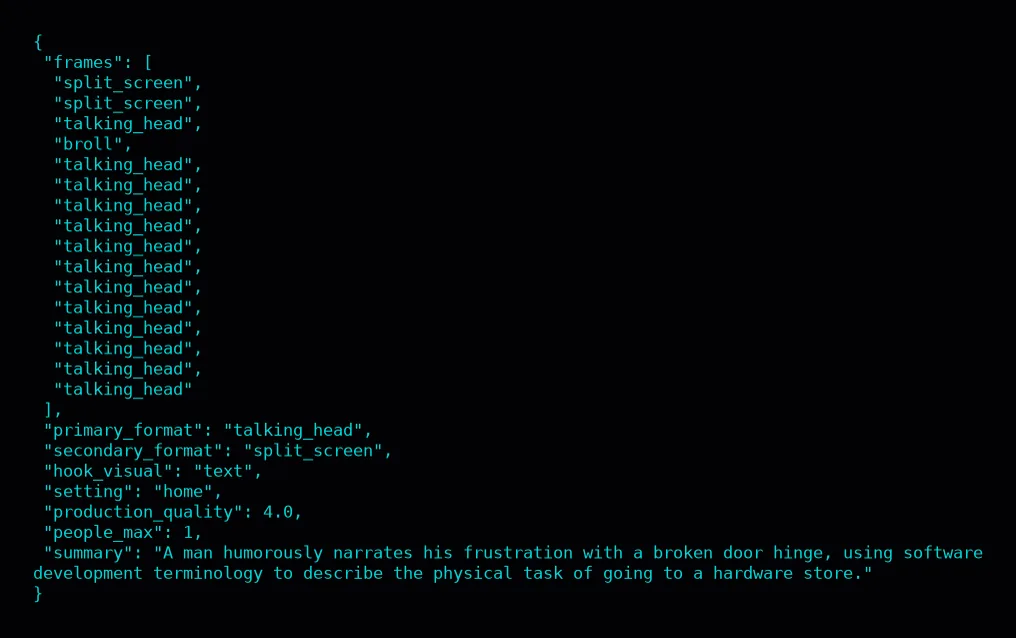
I checked the answers frame by frame. First reel 2, from the frames above:
- the model marked the first two frames as a split screen, and it was right: a smaller picture is laid over the shot of me, below my face. It is closer to picture-in-picture than to a split frame,
- the inset in frame 2 is a villa generated by AI, but the model did not mark it as ai_generated. When several categories fit, it picks one,
- it took the third frame, blurred by motion, for talking to the camera, the fourth, which shows only a door, for b-roll, and the rest for talking to the camera again,
- it rated the first visual impression as text, because a large “Facet AI” caption is visible at the start,
- the summary hit the point: a man humorously talks about a broken door in a programmer’s language. The model read that from the captions on the frames, because it does not get the sound,
- it rated production quality 4 out of 10, which sounds fair for a phone recording at home.
For reel 3 the model correctly recognised that talking to the camera alternates with a screen recording, and it read the topic correctly: registering a domain. Yet it set the main type of the reel to talking to the camera, although 11 of 16 frames are a screen recording. That is why, next to the primary_format field, the studio also computes each shot type’s share of all frames, which evens out such a mistake.
The same reel also shows inconsistency. Its first two frames have the same picture-in-picture layout as in reel 2 (me plus a smaller inset), yet they got the talking-to-the-camera label instead of split screen.
Reel 1 is the most interesting. It is a test clip from my project with UGC video created by AI: I generated both characters and the whole video in Google Veo 3.1. The model never used the ai_generated category. It took the characters for real people (6 frames “talking to the camera”, 3 frames “podcast”). Its summary mentions one woman, although the frames show two different ones. It rated production quality 7, because the generator creates polished, well-lit shots. Recognising AI video from single frames turned out to be this model’s weakest point.
Every answer was valid JSON with values from the category list.
Local or API
Gemini counts images in tokens. According to Gemini’s documentation, older models count an image up to 384 pixels as 258 tokens and split a larger one into tiles of 258 tokens each. In Gemini 3 models the image cost is set by the media_resolution parameter: up to 1,120 tokens per image by default, and up to 280 at low.
A reel with 16 frames is up to about 18,000 image tokens plus the prompt. 47 of my reels are about 0.84 million tokens. At USD 0.30 per million input tokens in Gemini 3.5 Flash-Lite that is about USD 0.25. At low it comes to 0.21 million tokens and about USD 0.06. The Batch API costs half that price, and results arrive within 24 hours.
Qwen on the Mac sees such a frame as about 112 tokens. That is my estimate from the image preparation settings. So 16 frames are under 2,000 tokens.
| Tokens | Time | Cost | |
|---|---|---|---|
| Qwen3.6 4-bit on the Mac (5.5 s per reel) | n/a | about 4 min | USD 0 in calls |
| Gemini 3.5 Flash-Lite (USD 0.30 / 2.50 per million tokens) | about 0.84M input (images only) (low: 0.21M), about 0.01M output | depends on the network | about USD 0.28 (low: about USD 0.09) |
The time on the Mac is an upper limit, because short reels have fewer frames and are processed faster (26 s reel: 3.7 s). I estimate Gemini’s answer at about 200 tokens per reel, the size of the JSON answer. That comes to about USD 0.28 for 47 reels, so again price does not decide the choice.
As with text, the API is cheap. Something else speaks for the model on your own computer. The frames of my reels never leave my computer. For my own reels and one request a day I would pick the API. For hundreds of reels and data I do not want to share, I pick the model on my own computer.
Where the vision model gets it wrong
This test showed three concrete mistakes:
- it did not recognise the AI-generated video in reel 1,
- the main type of reel 3 did not match most of its frames,
- it labelled picture-in-picture one way and then another.
The project shows a few more limits:
- the model rates frames, not motion, so it will not tell fast editing from a calm shot if the frames look similar,
- production quality on a scale from 1 to 10 is a subjective rating, so it is worth setting it with examples in the prompt,
- the model only chooses among the categories given, so a new type of reel will always land in the closest known category or in “other”.
That is why I review the answers on random reels from time to time and refine the category descriptions. I write more about checking models on your own tasks in my article on evaluating an agent.
How to write a prompt for image classification
The prompt for rating frames in my studio has a fixed structure. I recommend it to anyone who wants a model to assign categories to images:
- Context in one sentence: what the model sees (frames of one reel, in order) and which moments they come from.
- A list of allowed answers with a name and a short description of each. Names in English, without spaces, so they are easy to check in code.
- Answer fields with their type and range, for example “production quality from 1 to 10, where 3 is a casual phone selfie and 9–10 is studio level”. Examples on the scale greatly improve the consistency of ratings.
- A requirement that the answer is one JSON object and nothing else. The script checks every field anyway: it turns categories outside the list into “other”, clamps the rating to the 1–10 range and stores an unreadable number as missing. Through an API you can enforce JSON with a response schema, and on the Mac my script enforces it.
The prompt also has a version number. Every change to the list of categories or to how frames are picked raises the number, and results from an older version are computed again. That way answers from two different prompts never mix in the data, which is easy to miss with hundreds of reels.
Verdict
Qwen3.6 with vision is the simplest way to add image understanding to a set of tools on your own computer, without training your own model for the categories. On 32 GB it works well, as long as it is the only big model in memory. What decided the quality most was a prompt with a well-described list of categories, not the model itself.
If you want a model like this on your own computer to analyse your content, see how I work on AI automations and agents.