


- RapidOCR reads on-screen captions twice a second, but it sometimes drops Polish diacritics.
- MediaPipe finds the face, head direction and gaze, and HSEmotion rates emotions.
- All three run on the processor; on my three reels they took 18–22 s per minute of video together.
The thirteenth part of the series is about three small models that ran on the processor in my reel studio, next to the big models on the graphics chip. RapidOCR reads text from the screen, MediaPipe tracks the face, head direction and gaze, and HSEmotion rates the emotions on a face. None of them is impressive on its own, but together they tell what the viewer reads and who they look at. I test them on three of my own reels on a Mac mini M6 with 32 GB.
Text on screen
Captions in a reel do two things: they grab attention in the first seconds and hold it for people watching without sound. To judge this, the studio has to know what text is on screen, when and where. OCR does this: it reads text from an image.
I use RapidOCR. It is a project that converts models from PaddleOCR to the ONNX format, so they run on an ordinary processor without large extra libraries. To find text I use the PP-OCRv5 models in the light mobile version, and to read the letters the latin_PP-OCRv5_mobile_rec model. According to the documentation it also covers Polish. All the models together take about 13 MB.
Settings from the project:
- OCR reads two frames per second,
- I shrink the whole frame to 1280 pixels on the longer side,
- I reject readings below a confidence threshold of 0.6,
- I tell captions added in editing from text in the background by height: an element shorter than 2.5% of the frame height is more likely writing on a T-shirt or a laptop screen than a reel caption.
The text boxes become features of the reel: whether there is text in the first three seconds, how dense the captions are and whether text runs into the places Instagram covers.
Face, head and gaze
MediaPipe Face Landmarker is a Google model that finds 478 face points, including 5 on each iris, as a Google paper describes. It also returns a rotation matrix, numbers that describe how far the head is turned.
The studio works out two things from this data:
- from the centres of the irises and the head rotation, whether I am looking into the camera,
- from the size of the face in the frame, whether it is a close-up or a wide shot.
A separate model, MediaPipe Hand Landmarker, finds 21 points on each hand. The studio works out from them how fast the centre of the hand moves across the frame, a simple measure of gesturing.
One practical note from the project: a newer version of the MediaPipe library no longer has the old way of running it, called solutions. So I switched to the newer way, Tasks, with .task model files included in the repository. For vertical frames the library warns that the image is not square, but detection works: in my 47 s reel the face was visible in 79% of frames.
Emotions
HSEmotion is a set of light networks for recognising facial expressions. According to the authors they were trained on datasets including AffectNet, over a million face photos labelled by hand. I use the enet_b0_8_best_afew model, fine-tuned for video (the AFEW dataset). The author describes this approach in a paper on recognising expressions on mobile devices.
AffectNet has its own terms of use, so check them before any commercial use. I use emotions only as an internal measure when analysing my own reels. I use the hsemotion-onnx package under the Apache 2.0 licence, with a model that recognises eight kinds of facial expression. The face crop from MediaPipe goes into the model several times a second, and the result is the emotion with the highest probability.
I treat this model’s results with care. It recognises how a face looks, not what a person feels. A smile while talking can be read as happiness regardless of the content.
So my result prediction model does not use the name of the emotion, only the expression intensity at the start of the reel, how far the face moves away from neutral. That feature was among the more important ones for likes and comments. The share of face in the whole reel worked against saves and shares, and for comments. That does not mean you should hide your face. Rather, in reels where I talk to the camera a lot, what happens on screen besides my face also matters.
| What it returns | Median per reel | Per minute of video | |
|---|---|---|---|
| RapidOCR PP-OCRv5 | text, confidence and box, 2× per second | 36.6 s | 24.9 s |
| MediaPipe + HSEmotion | face, head, gaze, hands, emotions | 12.8 s | 8.9 s |
The studio numbers are higher than my measurement, and there is no contradiction in that. The 29 October batch had 47 reels with a median length of 90 s. OCR found a median of 9.5 text pieces per frame, more than in the densest test reel (7.3). OCR pays in time for every piece, so a minute of such a reel costs more. The same three reels took 4.5, 11.2 and 27.9 s of OCR in the studio, only slightly more than in the measurement, because other analysis stages run alongside OCR in the batch.
From the same data my model drew two more points: a large face at the start of the reel went with fewer shares, and eye contact at the start of the reel with more follows.
What I measure and how
| Mac mini M6 (Mac18,5) | |
|---|---|
| Processor | Apple M6, 12 CPU cores: 2 Super, 4 Performance, 6 Efficiency |
| Graphics | 12 GPU cores, Metal 4 |
| Memory | 32 GB shared by the processor and graphics, 170 GB/s bandwidth |
| Storage | 512 GB SSD (494 GB formatted) |
| System | macOS 27.0.1 |
I take three of my own reels (26 s, 47 s and 90 s) and run the same functions as in the studio. I measure OCR three times and face analysis with emotions twice. I save:
- the working time,
- the number of captions read,
- the share of frames with a face,
- the share of frames with eye contact,
- the first emotions recognised.
For the article I draw text boxes on the frame with the most readings: in the Veo clip and in my 47 s reel with captions. I take the measurement on a Mac with no other heavy programs running. I recorded a separate single run in a real Terminal window.

Results
26 s reel (Veo 3.1) 47 s reel (phone) 90 s reel (screen) OCR: time 3.4 s 8.3 s 25.1 s OCR: s per minute of video 7.8 s 10.6 s 16.7 s OCR: frames / text pieces read 52 / 23 93 / 367 181 / 1316 Face and emotions: time 4.6 s 6.1 s 7.7 s Face and emotions: s per minute of video 10.6 s 7.8 s 5.1 s Face in frame 100% 79% 31% Eye contact (when a face is visible) 50% 97% 98%
OCR time grows with the amount of text, not just with the length of the reel. The 90 s reel, which shows a computer screen most of the time, gave 1316 text pieces and cost 16.7 s per minute. The Veo clip without captions cost only 7.8 s.
Face analysis behaves the other way round: per minute it is cheapest where there is little face. MediaPipe analyses 10 frames per second at 512 pixels, while HSEmotion computes emotions only on frames with a face. Each run also starts by loading the models, which raises the per-minute cost of a short reel. The whole test took at most 1.1 GB of memory, so both stages fit easily next to large models on the graphics chip.

On my reel with captions OCR found and read every word, but Polish characters are hit and miss:
- in the caption “Poproszę go naprawić, poproszę kupić nowy, pójść do kasy, kupić, wrócić” the word “Poproszę” came out right in some frames and as “Poprosze” in the neighbouring ones,
- “Pójść” turned into “pójé”, “pójśé” or “pójsé” and only sometimes came out right,
- in the next caption, “Nie, nie mogę wrócić do komita, nie mogę postawić worktree…”, OCR wrote “mogę” as “moge” in every saved frame, with a confidence of 0.995–0.999.
That is an important lesson: high confidence does not mean correct diacritics. For searching and counting words it is therefore worth comparing text without Polish characters. The studio already does this: it strips the diacritics from every word before comparing.
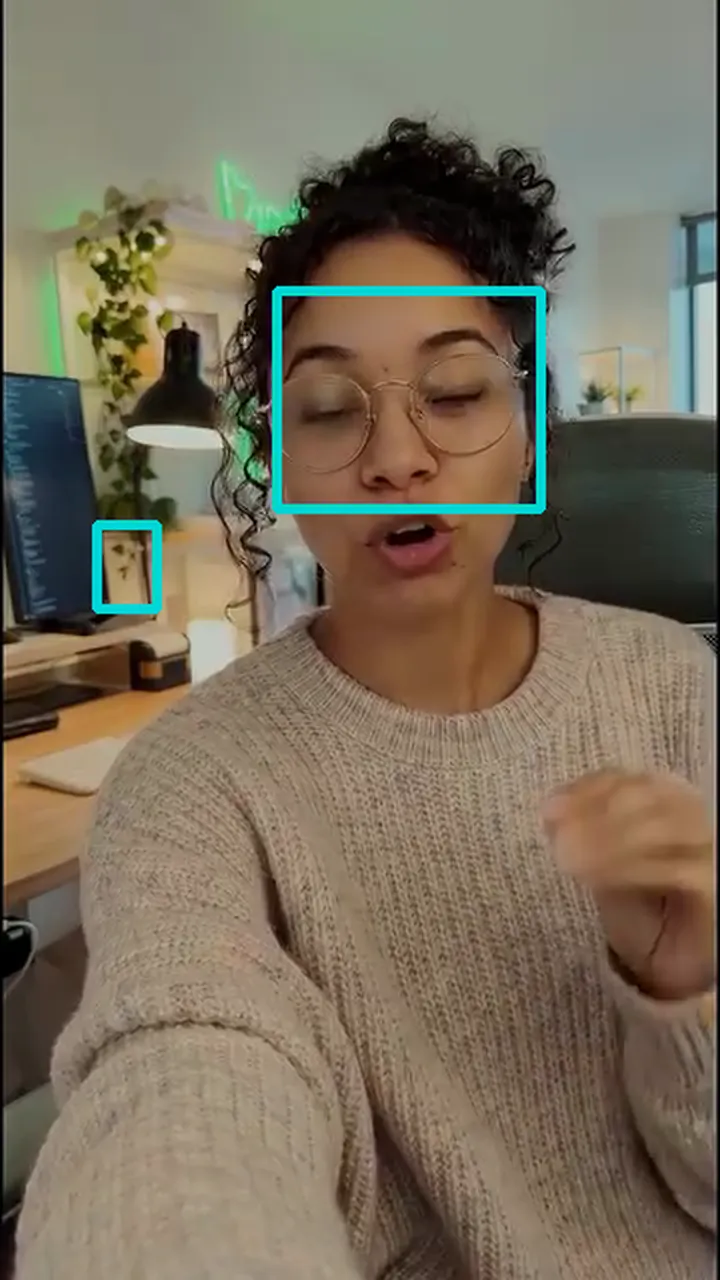
The Veo clip without captions looks different (boxes above). There OCR took the frames of the glasses and a picture on the shelf for text (“29” and “6”). So with reels without captions you have to reject single, short readings.
Face analysis gave sensible numbers. In my recordings I look into the camera 97–98% of the time a face is visible. In the Veo clip only half the time, because the characters talk to each other or have their heads turned by more than 15°, which the studio treats as the limit of eye contact.
Emotions are less certain:
- at the start of the door reel (47 s) the model saw sadness with a probability of up to 0.90, which fits the tearful face in the first seconds,
- in the domain reel (90 s), during ordinary talking, it alternated in the first two seconds between “disgust” and “surprise” with a probability of only 0.24–0.46, which I do not see in that recording.

Local or API
Big cloud companies offer text reading and face detection as paid services. With video this quickly turns into thousands of requests: two frames per second is 120 images for every minute of a reel.
You can also send frames to a multimodal model such as Gemini. According to its documentation it counts an image of up to 384 pixels as 258 tokens. Gemini can return object boxes (box_2d, on a 0–1000 scale), but a 720 × 1280 frame is at least two tiles of 258 tokens each. At 120 frames per minute every reel becomes a series of paid requests.
OCR on your own computer returns a box for every text piece for free, on the processor. It also does not occupy the graphics chip, which is computing other models at the same time.
What to watch out for
OCR most often gets decorative typefaces, text on a semi-transparent background and very short words wrong. A confidence threshold and rejecting elements with no letters or digits help.
Face detection fails when the face is in profile, in strong shadow or has its mouth covered. Emotion recognition depends on culture and the way someone speaks.
I treat all three models as sources of data for further analysis, not as finished answers. I write about building such ratings and checking them on your own data in my article on custom tests with Inspect and lm-eval.
How to check the interface zones in your reels
This is the most practical use of OCR on your own computer I know. Short-video apps cover part of the screen: the description and buttons at the bottom, like and comment icons at the side, the account name at the top. Those places are the interface zones. Text that lands there is simply not read. In the studio I check this automatically for every reel.
Checking interface zones with OCR
- 01Read the text boxesOCR twice a second, boxes stored relative to the size of the whole frame.
- 02Drop the backgroundI skip very small text, because it is more likely writing in the frame than a reel caption.
- 03Mark the zonesA bottom band for the description and buttons, a right band for icons, a top band for the account name.
- 04Count collisionsThe share of frames in which a caption box runs into a zone.
- 05Fix the templateIf there are many collisions, I move captions in the template, not in each reel separately.
In my reel template, text cards and bubbles have a fixed width and position set so that they avoid the interface zones. This test makes sure new reels do not break that.
Face detection from MediaPipe works the same way: if the face is too low, the description covers it, and if it is too high, the account name does. These are simple rules, but without an automatic check they are easy to miss.
Verdict
These three models are an invisible but necessary part of video analysis. They run on the processor, do not need much memory and give data that big language models do not return in a usable form. I recommend RapidOCR and MediaPipe without reservation. I treat emotion recognition as a curiosity and a measure of expression intensity, not as a judgement of feelings.
In the previous parts I wrote about the models that watch the picture and listen to the sound. New parts of the series appear every day.