


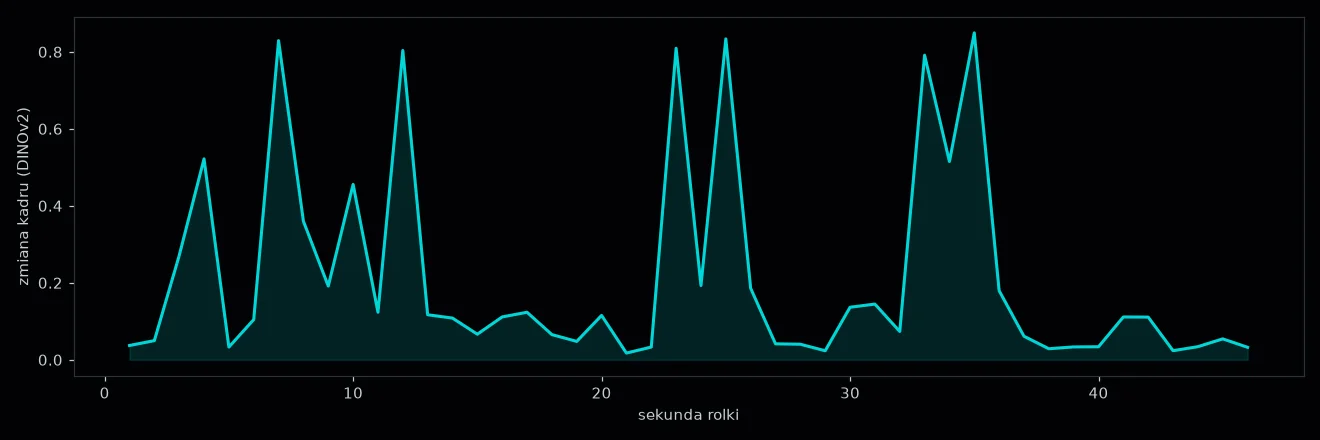
- DINOv2 turns each frame into a list of numbers, from which I work out how much the picture changes second by second.
- CLIP with a LAION add-on rates frame aesthetics, and SigLIP was a backup.
- V-JEPA 2 sees motion in 4-second clips and was the longest analysis stage: a median of 52.5 s per minute of video.
The twelfth part of the series is about four models that look at the picture in my reel studio but describe nothing in words. They do not say “there is a man at a desk in the frame”. They turn the picture into numbers: lists of numbers, scores and curves of change. From these numbers come features such as editing pace, how much the picture changes at the start of the reel, and frame quality. I test DINOv2, CLIP with the LAION aesthetics add-on, SigLIP and V-JEPA 2 on three of my own reels on a Mac mini M6 with 32 GB.
A picture turned into numbers
Most image models work on the same principle inside. The image goes into the model, which returns a vector, a long list of numbers describing the content of the image. Two similar images have similar vectors, and two different ones lie far apart. You do not need to know what each number means. It is enough to compare vectors.
DINOv2 is a model from Meta. It went through learning without labels, on images alone, without captions. The large version has about 300M parameters and was made by distillation from a model with about a billion parameters. The authors write that its vectors work well without extra training.
In the studio I take one frame per second, compute its vector and compare it with the previous frame using cosine similarity. This gives a curve I call frame novelty. It is high when the shot changes or something new appears on screen, and low when the same thing is visible for several seconds.
V-JEPA 2 is also a Meta model, but trained on video. According to the authors it is meant for understanding, prediction and planning from videos. Most of its training used clips of 16 frames, and only the final stage 64 frames, hence “fpc64” in the name. In the studio I give it 4-second clips of 20 frames (5 frames per second, 256 pixels).
Because it was trained on video, V-JEPA 2 sees motion, not just a change in the picture: a gesture, a head turn, a camera move. In the studio I compute two things from it:
- a second novelty curve, based on motion,
- the reel loop, how similar the end of the reel is to its beginning. It tells whether the video loops smoothly.
The reel loop matters because reels on Instagram play over and over.
Meta publishes the code and the model in the V-JEPA 2 repository. The licences are open:
- the V-JEPA 2 code is under MIT, and the model itself on Hugging Face under Apache 2.0,
- DINOv2 is under Apache 2.0,
- the CLIP model is under MIT,
- SigLIP and the LAION add-on are under Apache 2.0.
Aesthetics are rated by the LAION Aesthetics v2 predictor. It is a prediction head, a small network on top of vectors from OpenAI’s CLIP ViT-L/14. It was trained on image ratings given by people on a scale from 1 to 10: photos, AI images and logos. It returns a number that I convert to a scale from 0 to 1.
SigLIP was the backup. It gives a zero-shot rating, without special training: it compares the image with four English descriptions, two of a professional shot and two of an amateur one, without an extra head.
| What it measures | Model file | |
|---|---|---|
| DINOv2 large | frame novelty, 1 frame per second | 1.22 GB |
| CLIP ViT-L/14 + LAION v2 | frame aesthetics (0–1) | 1.22 GB |
| SigLIP so400m | zero-shot aesthetics (backup) | 3.51 GB |
| V-JEPA 2 ViT-g (fpc64), 4 s clips | motion, motion novelty, loop | 4.14 GB |
Pitfalls I found in the project
These models look simple to use, but each one had its own pitfall in the project. I list them because none of them reported an error: the results were simply wrong.
- V-JEPA 2: the first version prepared frames with a generic formula instead of the averages and deviations stored in the model’s settings. As a result the vectors fell outside the range the model was trained on.
- V-JEPA 2: the start of the reel and the rest were computed with different time shifts (0.5 s and 1 s), which gave an artificial zero at the start. After setting a fixed shift of 1 s, the feature comparing motion at the start and in the rest of the reel changed from 0.99 to 2.77.
- LAION: the code shipped with the model did not work with the new version of the transformers library, so I put the model together by hand from the file. On top of that the head needs normalisation of the vectors. Without it, it returned negative scores.
- CLIP in the aesthetics rating was created twice, which doubled memory and time. One was enough.
Normalisation of the data is the most common source of such silent errors. The conclusion is simple: with models that return numbers, check the distribution of results on a few known examples, not just whether the code ran.
What it adds to rating a reel
V-JEPA 2 was the most expensive stage of the whole analysis. On 47 of my own reels (79.2 minutes of recordings) it took 71.2 minutes, or 54 s per minute of video. The median is 87 s per reel and 52.5 s per minute. DINOv2 together with the aesthetics rating took a median of 12.1 s per minute of video.
The LAION aesthetics rating gave one of my earlier reels 4.41 out of 10. I still have to set the “weak aesthetics” threshold on the collected reels. The same goes for the still-picture threshold from V-JEPA 2: the first version treated most calm recordings as still and is also waiting to be fixed.
What I measure and how
| Mac mini M6 (Mac18,5) | |
|---|---|
| Processor | Apple M6, 12 CPU cores: 2 Super, 4 Performance, 6 Efficiency |
| Graphics | 12 GPU cores, Metal 4 |
| Memory | 32 GB shared by the processor and graphics, 170 GB/s bandwidth |
| Storage | 512 GB SSD (494 GB formatted) |
| System | macOS 27.0.1 |
I take three of my own reels (26 s, 47 s and 90 s) and run the same functions as in the studio:
- I run DINOv2, the LAION aesthetics rating and SigLIP on the processor and on the Mac’s graphics chip, three runs each,
- I run V-JEPA 2 only on the graphics chip, two runs each, because it has about a billion parameters (4.14 GB), and even on the graphics chip it takes about 50 s per minute of video.
Each run loads the model again, just like the studio. Only the first run of the first reel was clearly slower, because the files were not yet in the system’s cache.
All four models get only the central square of the vertical frame, so captions at the top and bottom of the shot are invisible to them. I save the times, the aesthetics scores and the novelty curve. I take the measurement on a Mac with no other heavy programs running. I recorded a separate single run in a real Terminal window.

Results
| 26 s reel | 47 s reel | 90 s reel | |
|---|---|---|---|
| DINOv2, processor | 4.0 s | 7.4 s | 13.6 s |
| DINOv2, graphics chip (MPS) | 1.9 s | 3.5 s | 5.9 s |
| LAION aesthetics, processor | 4.4 s | 5.0 s | 5.0 s |
| LAION aesthetics, graphics chip | 4.1 s | 4.7 s | 4.5 s |
| SigLIP, processor | 3.4 s | 3.8 s | 3.6 s |
| SigLIP, graphics chip | 1.6 s | 2.1 s | 1.9 s |
| V-JEPA 2, graphics chip | 23.9 s (33 clips) | 38.5 s (54 clips) | 68.5 s (98 clips) |
The time of DINOv2 and V-JEPA 2 grows with the length of the reel, because both process every second. DINOv2 takes one frame per second, and V-JEPA 2 analyses clips with motion. V-JEPA 2’s 4-second clips start every half second at the start of the reel and every second after that. So each second of the recording goes through the model about four times (eight at the start of the reel). One clip takes about 0.7 s of graphics chip work.
On the graphics chip, LAION aesthetics and V-JEPA 2 compute in half precision. That speeds up the work and saves memory, while the result changes only in the third decimal place.
Both aesthetics ratings take up to 6 frames. In practice 5, because the sixth falls exactly at the end of the recording, and the last 20% of the reel goes unrated. Loading the model always costs the same, so their time barely depends on the length of the recording.
Per minute of video, DINOv2 on the graphics chip takes about 4 s, and V-JEPA 2 from 46 to 56 s. The process used at most 7.5 GB of memory, less than a quarter of 32 GB.
The graphics chip speeds DINOv2 up 2.1–2.3 times and SigLIP about 2 times. LAION aesthetics barely gains (4.5 s instead of 5.0 s on the longest reel), because most of the time goes on loading the model and reading the frames, while rating 5 images is a trifle. V-JEPA 2 on the graphics chip matches the 52.5 s per minute from the project: it is still the most expensive stage of the whole analysis.
The aesthetics scores are more interesting:
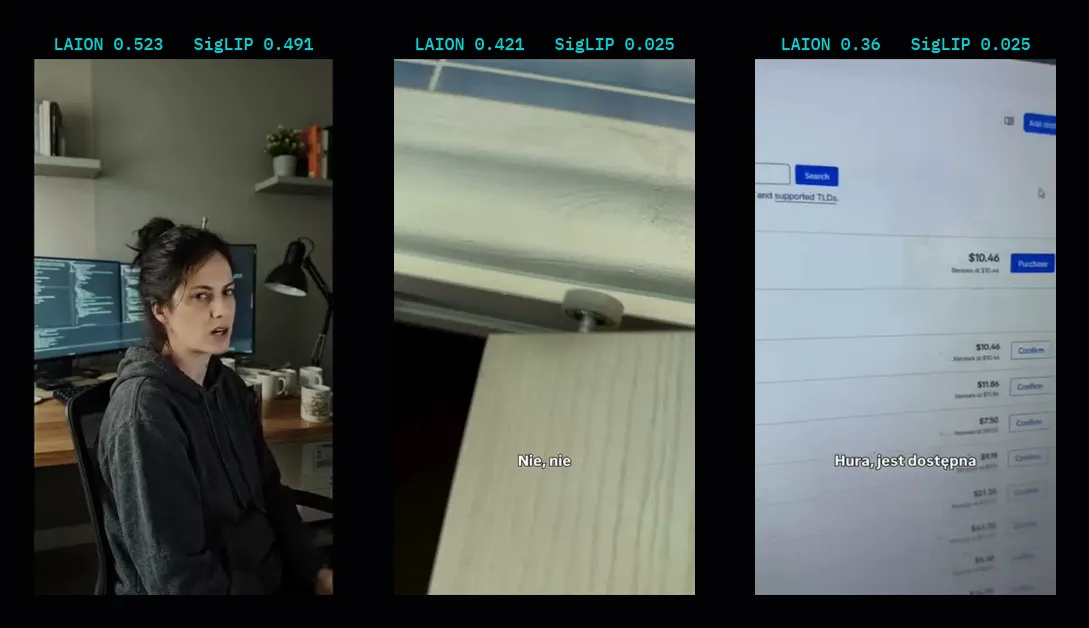
- LAION gave my reels 0.52, 0.42 and 0.36 (on a scale from 0 to 1, so 5.2, 4.2 and 3.6 out of 10),
- SigLIP gave 0.49, 0.025 and 0.025.
Both models agree that the first reel is the prettiest. It is the clip I generated entirely in Veo 3.1: it has polished light and shots. The models differ in scale. LAION rates gently and also tells my two phone recordings apart. SigLIP gives both home recordings almost zero. It compares frames with two descriptions of a professional shot (“a professional, well lit, high quality video frame”) and two descriptions of a poor image (“a blurry, noisy, badly lit amateur photo” and “a low quality screenshot with poor contrast”).
Why such an extreme 0.025? SigLIP was trained with a different method (with a sigmoid function), but I compute a softmax with a multiplier of 100, as in CLIP. So each frame goes almost entirely to one description, and the score is almost all-or-nothing. A score of 0.49 means that two or three of the five frames won with the professional description. The second poor-image description fits the 90 s reel, because it is mostly a computer screen filmed with a phone, so the rating has an easy job here.
The novelty curve also gave concrete numbers:
- average frame novelty was 0.07 for the Veo clip, 0.22 for the door recording and 0.13 for the domain reel,
- the start of the reel (first 3 s) was calmer than the rest in every reel: its novelty was 0.24 to 0.61 of the average novelty of the rest.
So the Veo clip that both models rate prettiest is also the most still. That is why in the studio I treat these scores as a hint for comparison, not a verdict.
Local or API
These models have no sensible equivalent among paid cloud services, because their output is vectors and curves, not text. Services that turn images into vectors do exist. But I would have to send every frame of every reel, and at one frame per second that is about 4,800 images for 79 minutes of my recordings.
On the Mac DINOv2 processes them in about 5 minutes on the graphics chip (about 12 minutes on the processor), without sending anything. Here the model on your own computer wins not on price, but because it makes this way of working possible at all. I write about open models and what “open” means in their licences in my article on open models.
How to compute frame novelty yourself
The DINOv2 novelty curve is the simplest video feature I can recommend to start with. The recipe is short:
- take one frame per second from the recording,
- cut out the central square and shrink it to the size the model expects,
- compute each frame’s vector as the average of the vectors of its pieces,
- compare each frame with the previous one using cosine similarity.
Frame novelty is simply one minus the similarity.
You can read several things from such a curve right away:
- average novelty tells you the editing pace,
- novelty in the first three seconds compared with the rest of the reel tells you whether the start is visually livelier than the middle,
- long flat stretches show places where the viewer sees nothing new for several seconds.
In my reels such flat stretches are almost always longer pieces of talking to the camera without cards or close-ups. Those are exactly the places worth trimming or breaking up with graphics.
Verdict
DINOv2 gives the most for the least cost in the whole set: it is light, fast and gives a useful curve of picture change. The LAION aesthetics rating is useful as a hint, but its thresholds need setting. V-JEPA 2 sees things no photo model sees, but it takes the most time, so I use it only where motion really matters. SigLIP stays a backup.
In the previous part I described the models that listen to reels: AST and CLAP. I build video analysis fitted to your content as part of AI automations and agents.