


- Qwen3.6-35B-A3B has 35B parameters but computes only about 3B per token, so its 4-bit version runs smoothly on a 32 GB Mac mini.
- In my reel studio it rates a reel in seconds, with no cloud service.
- Thinking mode helps with code but makes answers over ten times slower: I show the exact numbers.
This is the first part of a series in which I test, on my own computer, every AI model I used in my reel studio. I start with Qwen3.6-35B-A3B, the model that read and rated the text of reels in the studio. I run it on a Mac mini M6 with 32 GB of memory, without connecting to any cloud service. I check three things: how fast it answers, how long it “thinks” before answering and how much memory it uses.
What I need a language model for in a reel studio
My reel studio is a set of scripts that analyses short videos. It splits them into shots, turns speech into text, looks at frames, listens to the sound, and finally gives a score and suggests an editing plan. Most of these stages are done by small models that each know how to do one thing. One stage, though, needs language understanding. The script has to read the first sentences of a reel and judge whether they spark curiosity, whether the second sentence develops what the first one promised and whether the ending invites a comment. Regular expressions, which are text search patterns, and simple rules did that before. They worked badly, because they looked for words and did not understand what the sentences meant.
I replaced them with Qwen. The model gets the transcript of the reel, its caption and the text shown on screen. It answers in JSON format: it gives four scores from 1 to 10, marks whether the ending sounds like a template and suggests three on-screen texts. This stage went through every analysis run of my reels. On 47 of my own reels a rating took a median of 4.4 s per reel. That is why in this test I am not checking the model on puzzles from rankings, but on a task it actually did.
What this model is and why it fits on a Mac
Qwen3.6-35B-A3B is built as a Mixture of Experts model and released under the Apache 2.0 licence, which allows commercial use too. According to the model card on Hugging Face it has 35B parameters, but for each token it uses only about 3B of them. The model has 256 experts and for each token it picks 8 of them plus one shared expert. That way it computes roughly as much as a model with 3B parameters while drawing on the knowledge stored in 35B. Hence the A3B at the end of the name: about 3B active parameters.
The model accepts up to 262,144 tokens at once, and according to the card this context can be extended to about a million. For rating a reel that is far more than I need: the prompt with a whole reel has 1361 tokens.
The layer design is interesting too. The model has 40 layers, and each has a part called attention, which links information from different places in the text. Only every fourth layer uses full gated attention, which needs more memory with every new token. The rest use Gated DeltaNet linear attention, whose memory does not grow with the length of the text. That is why with long text Qwen needs less extra memory than older models of this size. The model also has an image module, so the same family rates photos and video frames. That is the topic of part five of the series.
On the Mac I run it through MLX, Apple’s library for AI models on M-series chips, and its add-on mlx-lm for language models. The full model in 16 bits would not fit in 32 GB of memory, so I use versions after quantization to 4 bits. I have two such versions on disk, prepared by the MLX community. The plain 4-bit version simply stores the model’s numbers in 4 bits.
The second version is DWQ (Distilled Weight Quantization, described in the mlx-lm documentation). After shrinking to 4 bits, the model is also tuned so that it answers as closely as possible to the original. The reference is usually the model before shrinking, but the card of this version gives no details. According to the documentation, preparing such a version takes longer but usually gives better results. In the studio the DWQ version rated the text of reels, and the plain 4-bit version, prepared with the mlx-vlm tool, rated images.
| 4-bit DWQ | 4-bit | |
|---|---|---|
| File size (checked on disk) | 20.66 GB | 20.40 GB |
| Parameters total / active | 35B / 3B | 35B / 3B |
| How it was shrunk | with tuning (DWQ) | plain |
| Job in my studio | rating the reel text | rating frames (images) |
| Library | mlx-lm 0.32.2 in the test | mlx-lm 0.32.2 in the test; mlx-vlm in the studio |
If you want to work out whether a similar model fits on your computer, I show the arithmetic step by step in my article on what fits on your own computer.
What I measure and how
| Mac mini M6 (Mac18,5) | |
|---|---|
| Processor | Apple M6, 12 CPU cores: 2 Super, 4 Performance, 6 Efficiency |
| Graphics | 12 GPU cores, Metal 4 |
| Memory | 32 GB shared by the processor and graphics, 170 GB/s bandwidth |
| Storage | 512 GB SSD (494 GB formatted) |
| System | macOS 27.0.1 |
I always repeat the test the same way, so the results from the parts of the series can be compared:
How I measure Qwen
- 01The same MacMac mini M6, 32 GB, no other heavy programs; the script waits until the computer is free.
- 02The same instructionExactly the one the studio uses to rate reels, on a reel from my channel (3:51, in Polish).
- 03Two modesWithout thinking and with thinking, temperature 0, 3 runs each.
- 04Two model versions4-bit DWQ and plain 4-bit, each run separately.
- 05A coding taskA Python function checked by five of my tests, with and without thinking (DWQ only).
I measure several things:
- time to the first token of the answer (TTFT for short), which is mostly the time spent reading the instruction,
- how fast the model reads the instruction and how fast it writes the answer, in tokens per second,
- the number of tokens the model wrote before it started answering,
- the time of the whole answer,
- the highest memory use during the run, as reported by MLX.
I use mlx-lm version 0.32.2. I set the temperature to 0, although the model card recommends 0.7 without thinking and 1.0 with thinking (0.6 for code). I do this on purpose: in ratings I want the same reel to always get the same score. Models you run locally are best checked on your own tasks, not just in ranking tables. I write about this in my article on custom tests with Inspect and lm-eval. I save every result to a file together with the command and library versions, and I record the run in a real Terminal window.
Results: speed and answer quality

4-bit DWQ 4-bit Loading the model 4.6 s 4.0 s First run without thinking 7.3 s (first token after 4.2 s) 4.4 s (first token after 2.0 s) Later runs without thinking 3.9 s (first token after 0.8 s) 3.2 s (first token after 0.8 s) Reading the instruction (warmed up) about 1680 tokens/s about 1720 tokens/s Writing the answer 49 tokens/s 69 tokens/s With thinking (median of 3) 63.7 s, 2870 thinking tokens 39.5 s, 2437 thinking tokens Highest memory use (MLX) 21.98 GB 20.83 GB
The most important row is the writing speed: the DWQ version writes 30% slower, even though its files are a similar size. I found the explanation in the configuration files of both versions, the config.json for DWQ and for plain 4-bit. They show that the two versions store the parts of the model differently:
- in plain 4-bit almost everything is stored in 4 bits, and only 80 small parts that control the experts stay at 8 bits,
- in DWQ the experts are also stored in 4 bits, but all attention layers, the input layer and the output layer use 8 bits.
This matters because for every token the model reads the attention layers and the output layer in full, and only 8 of the 256 experts. From the model’s dimensions I calculate that for every token DWQ reads about 2.6 GB from memory, and plain 4-bit about 1.7 GB. On a Mac the writing speed depends mainly on how much data per second can be read from memory, that is, on memory bandwidth. Apple lists 170 GB/s for the M6 Mac mini with 32 GB. At 1.7 GB per token the upper limit is about 100 tokens per second, and I measure 69. The files of both versions are a similar size because the experts take 18.1 GB in each, and the plain version also includes a 0.9 GB image module (the text part alone is 19.5 GB). You can feel the difference: a rating with thinking takes about 64 s in DWQ and under 40 s in plain 4-bit.
The first run after loading the model is always slower, because the system moves the model’s data from disk into memory and prepares the graphics chip for the calculations. That is why the table shows the first run separately from the median of the later ones. The studio loads the model once for a whole batch of reels, so this extra time spreads over hundreds of ratings.
Without thinking both versions gave identical scores in all three runs: opening 3, promise 4, continuity 6, chance of comments 7, and the ending marked as a template. Only the on-screen text ideas differed: “Back to coding with AI” in DWQ and “Why I disappeared from Instagram” in the plain version. Each of the 12 ratings (6 without and 6 with thinking) was valid JSON that the script read without an error.
In the coding task the model had to write a function that splits a transcript into sentences. Without thinking the answer was ready after 7.4 s and passed 4 of my 5 tests. It failed the test with the sentence “Wersja 2.5 jest szybsza. Serio!” (“Version 2.5 is faster. Really!”), because the function treated the full stop in “2.5” as the end of a sentence. As a result it lost the beginning “Wersja 2.” and returned “5 jest szybsza.” as the first sentence. With thinking the model worked for 98 s, wrote 4575 tokens of reasoning and returned a shorter function that passed all 5 tests.
Thinking: when it pays to wait
Qwen3.6 has a thinking mode. In it, the model writes out its reasoning before the actual answer, and that reasoning is usually not shown in the result. These are ordinary tokens: writing them takes as much time as writing the answer, and they take up memory. In my studio I turned thinking off for reel ratings. When rating against a fixed schema, thinking did not improve the answer format and did not make the scores more repeatable, but it made the answer more than ten times slower. Whether the scores with thinking are more accurate, I do not know, because I have nothing to compare them with. Without thinking the JSON was ready after a few seconds, and in the test the script read it without an error every time.
It is different with tasks where the model has to plan something. The recording shows it best: the model gets a question about how to split work between a model on your own computer and a paid cloud service, and before it answers, it writes its reasoning for a long time.

When rating the reel, DWQ thought for 60.6 s and wrote 2870 tokens, about 10,000 characters of reasoning before an answer with five numbers. Plain 4-bit thought for less: 2437 tokens in 37.3 s.
Thinking also changed the scores themselves. DWQ with thinking was stricter: the promise got 2 instead of 4, continuity 2 instead of 6, and the chance of comments 6 instead of 7. In the plain version the change was smaller: continuity 5 instead of 6. I do not know which scores are more accurate, but the lesson is important: turning thinking on changes the results. If you compare scores from different weeks, do not switch this mode halfway through a project.
In the coding task thinking gave a clear benefit: the function passed 5 tests instead of 4, but I waited 13 times longer for it.
I use a simple rule. I turn thinking on where a mistake is costly and the answer is not a rigid form, for example with code. For classification, ratings and pulling data out of text I turn it off. Instead I describe the scale and every field precisely in the instruction, for example: 5 is an average reel, and only the top 5% get 9–10.
Memory: 32 GB is less than it seems
The model files alone take 20.66 GB. On top of that comes memory for the context, which grows with every token read and written, plus whatever the system and other programs need. I learned this from my own mistake in the project. When analysing a single reel, the script loaded the image version of Qwen next to the text version, and Metal, Apple’s layer for calculations on the graphics chip, stopped with an out-of-memory error. The fix was simple: before loading one big model, the script now releases the other. But the error shows the rule: a 32 GB Mac has room for one big model at a time.
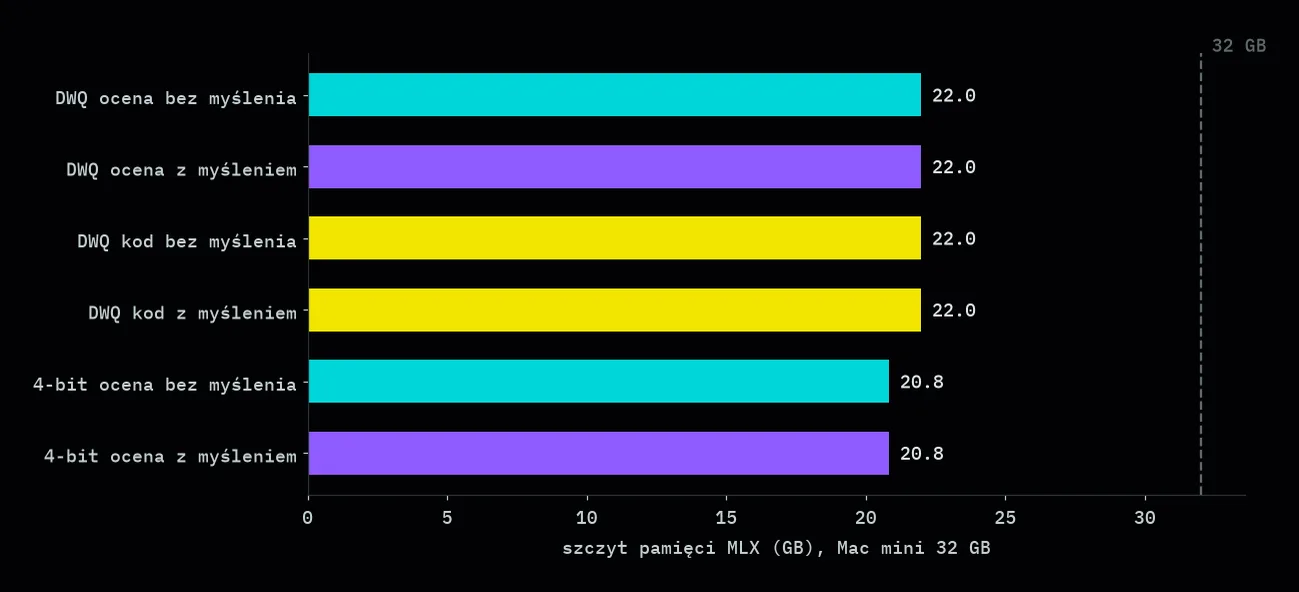
According to MLX the highest memory use was 21.98 GB in DWQ and 20.83 GB in plain 4-bit, regardless of whether the model was thinking. Long thinking did not raise this number for two reasons:
- 4,000–5,000 tokens take little memory compared with the 20 GB of the model itself,
- most of Qwen’s layers use linear attention, whose memory does not grow with the length of the text.
The memory counter of the Python process itself showed at most 12.9 GB. That is less than MLX reports, because MLX keeps the model in Metal buffers, and the process memory counter does not fully include them.
With about 22 GB used out of 32 GB, about 10 GB is left for the system and programs. That is enough to work with one big model, but not enough for a second model of this size. After closing the DWQ version, the system showed only 9.4 GB of free memory (23.6 GB at the start). The swap file, the space on disk the system uses when memory runs short, grew from 2.95 to 3.41 GB. Even so, the plain 4-bit version loaded and went through all runs without an out-of-memory error. So I take the “one big model at a time” rule from the error in the project, not from this measurement.
Local or API: the maths on my reels
A model on your own computer sends no bill for tokens, but it is not free either: it costs the Mac’s working time and the Mac itself. To compare fairly, I calculate what the same rating would cost through an API. According to Anthropic’s pricing, Claude Haiku 5.5 costs USD 0.10 per million tokens sent to the model and USD 0.50 per million tokens of answer (for instructions up to 100,000 tokens). According to Google’s pricing, Gemini 3.5 Flash-Lite costs USD 0.30 and USD 2.50 respectively.
| Time | Cost | |
|---|---|---|
| Qwen 4-bit DWQ on the Mac (3.9 s per rating) | about 3 min | USD 0 in calls |
| Qwen 4-bit on the Mac (3.2 s per rating) | about 2.5 min | USD 0 in calls |
| Claude Haiku 5.5 (USD 0.10 / 0.50 per million tokens) | depends on the network | about USD 0.01 |
| Gemini 3.5 Flash-Lite (USD 0.30 / 2.50 per million tokens) | depends on the network | about USD 0.04 |
One rating is 1361 tokens of instruction and 152–164 tokens of answer. So 47 ratings come to about 64,000 tokens sent and 7,000 tokens of answer. Both providers also have a cheaper mode for jobs that do not have to be ready straight away:
- in Anthropic’s Batch API results usually arrive within an hour, and Haiku 5.5 costs half price, about USD 0.005 in total,
- Gemini 3.5 Flash-Lite in this mode costs USD 0.15 and USD 1.25 per million tokens, about USD 0.02 in total.
For the free Gemini plan the price list notes that Google uses the data you send to improve its services. With material you do not want to share, that is one more reason to choose a model on your own computer. I count tokens with Qwen’s tool, and every provider splits text into tokens a little differently, so the API cost is an estimate. I count without thinking, because with thinking the answer is 16–20 times longer.
This maths shows something that repeats throughout the series: for simple, repeatable ratings a cheap API costs pennies, so a model on your own computer does not win on price. It wins on something else. The data never leaves my computer, I have no rate limits or price changes in the middle of a project, and I can run the same model on a thousand reels overnight without thinking about a bill. I explain how to work out the cost of such a job in my article on task cost in tokens.
Verdict
Qwen3.6-35B-A3B is now my default model for text work on a 32 GB Mac. It is fast enough to rate hundreds of reels one after another, it understands Polish and it sticks to the JSON format. I turn thinking on only when the task needs it, and I make sure no second big model is loaded next to it.
In the next parts I test the other models from my studio: image editing, turning speech into text, a talking avatar and the models that watch and listen to reels. Want a set of models like this on your own computer, fitted to your content? See how I work on AI automations and agents.