


- On a Mac mini M6 Whisper turbo on the graphics chip turned 58 s of audio into text in 1.5 s, about 14 times faster than large-v3 on the processor (21.2 s).
- Without a name vocabulary both versions got 5 of 11 names right, and large-v3 with the vocabulary in hotwords all 10 spoken ones.
- Both need 2.3–3.7 GB.
Turning speech into text is the first stage of almost every set of video tools: without text there are no captions, no cuts at the right word and no rating of the reel’s first sentence. In the third part of the series I check two versions of Whisper that I have on a Mac mini M6 with 32 GB. The first is faster-whisper large-v3, which runs on the processor. The second is whisper-large-v3-turbo, which runs on the graphics chip. I test them on a Polish recording full of AI model names, because names like these are exactly where transcription on your own computer goes wrong most often.
How Whisper worked in my reel studio
In the reel studio Whisper turns sound into words and adds timestamps to each word. From these word timestamps the studio works out:
- sentences and where they end,
- speaking pace in words per minute,
- the pause after the first sentence,
- where captions go in the edit.
I chose the settings for speed and stability. The large-v3 model in its faster-whisper version runs on the processor in the int8 format. Beam search has a width of 1, which means the model always takes the most likely next word. The VAD filter skips the parts without speech. I also turned off the option that adds the previous text to the context of the next chunk, because on reels with music it caused the same sentences to repeat.
With these settings the stage went through every analysis run. The run I measured most precisely is the one on 47 of my own reels: 79.2 minutes of recordings in total. Transcription took 42.5 minutes there, a median of 31.8 s for every minute of video. That is roughly twice as fast as the recordings last, and on the processor alone. In the whole reel analysis (3.52 h for 47 reels), transcription was the second longest stage, after the motion model.
| Total | Median per reel | Per minute of video | |
|---|---|---|---|
| Motion (V-JEPA 2) | 71.2 min | 87.0 s | 52.5 s |
| Transcription (Whisper) | 42.5 min | 44.1 s | 31.8 s |
| On-screen text (OCR) | 37.2 min | 36.6 s | 24.9 s |
| Frames (DINOv2, aesthetics) | 15.1 min | 18.0 s | 12.1 s |
| Sound (AST, CLAP) | 14.9 min | 16.1 s | 10.5 s |
| Face (MediaPipe) | 13.4 min | 12.8 s | 8.9 s |
Whisper in Polish has one weakness I know from practice: proper names. “DINOv2”, “V-JEPA2”, “Qwen” or “CatBoost” spoken in a Polish sentence turn into similar-sounding words. That is why, when transcribing my own recordings for editing, the studio passes a list of names in the initial_prompt parameter. This test checks how much the list really helps.
Two versions: large-v3 and turbo
According to the model card, large-v3-turbo is a reduced large-v3. It has 4 decoder layers instead of 32 and 809M parameters instead of 1.55B. The decoder writes text token by token, so it has the biggest effect on working time. The authors write that turbo loses little quality as a result.
I run the two versions differently. Turbo runs through MLX on the Mac’s graphics chip. Large-v3 runs through faster-whisper, a version of Whisper built on the CTranslate2 engine. On a Mac this engine calculates only on the processor: according to the CTranslate2 documentation, the only graphics cards it supports are NVIDIA and AMD.
Both versions build on the design described in OpenAI’s Whisper paper. The first version was trained on 680,000 hours of recordings from the internet. According to its model card, large-v3 was trained on a million hours of recordings with approximate captions and 4 million hours of recordings captioned by an earlier model.
| faster-whisper large-v3 | whisper-large-v3-turbo | |
|---|---|---|
| Parameters | 1.55B | 809M |
| Decoder layers | 32 | 4 |
| Where it runs on a Mac | processor, int8 | graphics chip, MLX |
| Library | faster-whisper (CTranslate2) | mlx-audio |
| Licence | MIT (conversion), Apache 2.0 (original) | MIT (OpenAI model) |
What I measure and how
| Mac mini M6 (Mac18,5) | |
|---|---|
| Processor | Apple M6, 12 CPU cores: 2 Super, 4 Performance, 6 Efficiency |
| Graphics | 12 GPU cores, Metal 4 |
| Memory | 32 GB shared by the processor and graphics, 170 GB/s bandwidth |
| Storage | 512 GB SSD (494 GB formatted) |
| System | macOS 27.0.1 |
The reference is the raw recording for one of my reels (called v13 in the project): 58 seconds in which I read a prepared script word for word. The script has 124 words and many names: DINOv2, Whisper, AST, V-JEPA2, Claude, GPT, CatBoost, Qwen. This lets me calculate WER, the share of words the model wrote wrong. I also count separately how many of the eleven proper names the model wrote correctly.
I run each version in several variants, always with the language set to Polish:
- without a list of names,
- with a list of names in the
initial_promptparameter, - large-v3 also with the list of names in the hotwords parameter.
I repeat the timing three times. For the speed test I add a longer reel (3:51, or 231.5 s). For each variant I record the time, RTF, WER and the number of correct names. I take the measurement on a Mac with no other heavy programs running. I recorded a separate single run in a real Terminal window.

Results: speed
| large-v3, processor (int8) | turbo, graphics chip (MLX) | |
|---|---|---|
| Loading the model | 1.3 s | 0.3 s |
| 58 s reel, no list of names | 21.2 s (RTF 0.37) | 1.5 s (RTF 0.026) |
| 58 s reel, with list of names | 22.0 s (RTF 0.38) | 1.5 s (RTF 0.026) |
| 3:51 reel (231.5 s) | 75.4 s (RTF 0.33) | 6.5 s (RTF 0.028) |
| Highest memory use | 3.7 GB (whole process) | 2.3 GB (MLX) |
An RTF below 1 means the model works faster than the recording lasts. At RTF 0.33 a minute of speech takes about 20 seconds of processor work, and at 0.026 a second and a half of graphics chip work. The three runs differed by at most 0.42 s on the processor and 0.09 s on the graphics chip, so the median describes the typical time well.

Turbo on the graphics chip was about 14 times faster on the short reel and 12 times faster on the long one. A minute of speech takes it about 1.6 s, while large-v3 on the processor needs about 20 s.
Neither version needs much memory: large-v3 in int8 took 3.7 GB and turbo 2.3 GB. These are two different measures, though. For the processor I give the memory of the whole process, and for MLX only the memory of the model’s data, so do not compare them very precisely. On a 32 GB Mac both versions fit next to a large language model. They take little disk space too: 3.1 GB for large-v3 and 1.6 GB for turbo.
This is not a clean processor-versus-graphics-chip comparison, because several things differ at once:
- the model: large-v3 is bigger than turbo,
- the hardware: processor or graphics chip,
- the settings: on the processor I also compute word timestamps and the VAD filter, and in mlx-audio I do not.
So part of turbo’s lead comes from the smaller decoder, and part from not doing that extra work. If you want to compare the chips alone, you can run turbo in faster-whisper on the processor too.
The comparison with the project is interesting. There, the transcription stage took 31.8 s per minute of video, while in the test large-v3 needed about 20 s. In the project I measured the whole stage including preparing the file, and in the test only the transcription of a ready 16 kHz file. The difference is the time of everything that happens around the model. The list of names in initial_prompt adds less than a second on the processor and practically nothing on the graphics chip.
Results: quality and proper names
| WER against the script | WER against what I said | Names correct (of 11) | |
|---|---|---|---|
| large-v3, processor, no list of names | 0.323 | 0.057 | 5 |
| large-v3, processor, list in initial_prompt | 0.315 | 0.057 | 8 |
| large-v3, processor, list in hotwords | 0.290 | 0.036 | 10 |
| turbo, graphics chip, no list of names | 0.323 | 0.064 | 5 |
| turbo, graphics chip, list in initial_prompt | 0.274 | 0.021 | 9 |
Three runs of each variant gave identical text and identical WER. On the processor I use a beam width of 1, so the result is the same every time.
The eleven names are: DINOv2, Whisper, AST, V-JEPA2, Claude, GPT, CatBoost, Qwen, RAM-u (Polish for “of RAM”), API and viral. The list of names contained most of them, so the result with the list is the best possible case: I know the names in advance. In real editing that is exactly the case, because I know what I talk about in the recording.
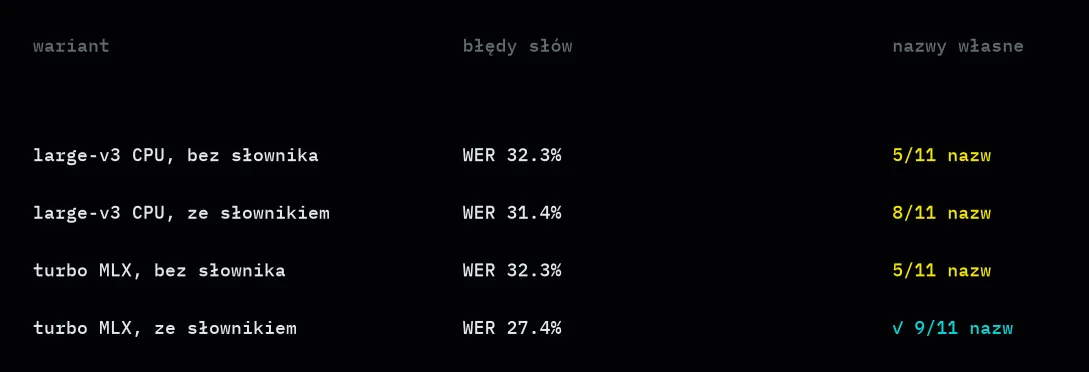
Without a list of names both versions made mistakes in almost the same places:
- “CatBoost” became “cut boost”,
- “Qwen” became the Polish-sounding “Kłęt” (large-v3) or “Kłę” (turbo),
- “V-JEPA2” became “VJEPA2” or “VJEPA 2”,
- turbo wrote “Claude” as “CLOD”, and large-v3 glued “AST527” together.
The list of names in initial_prompt fixed three names in large-v3: AST, V-JEPA2 and RAM-u. The last one was not on the list, so it is a side effect of the hint. Turbo with the list also got CatBoost and Qwen right, so on this recording it did better than the bigger model.
Large-v3 with the list, on the other hand, added the sentence “Dziękuje za uwagę” (“thank you for your attention”) at the end, which is not in the recording. That is a known Whisper hallucination: the “Careless Whisper” study links such additions to longer stretches without speech. The silence filter (Silero VAD) was on, and the addition still appeared. That is why in faster-whisper it is worth also setting the hallucination_silence_threshold parameter, which works together with word timestamps.
No variant got the eleventh name, “API”, for a simple reason: while recording I changed the ending of the script and never said that word. The real result with the list in initial_prompt is therefore 8 and 9 out of 10 spoken names.
While checking the text I found a detail that changes the conclusions. In faster-whisper, when the previous text is not added to the context, the initial_prompt list works only in the first 30-second chunk of the recording. After each chunk the context is cleared, which you can see in the library code. CatBoost and Qwen come at seconds 29 and 38 in my recording, so large-v3 had no chance to get them right. mlx-audio carries the hint into the following chunks by default, which is why turbo did better.
So I repeated the large-v3 measurement with the hotwords parameter, which faster-whisper adds to every chunk. Result: all 10 spoken names written correctly, in 22.3 s, almost the same time as with initial_prompt (22.0 s). That is the most important practical tip from this part: in faster-whisper, give the list of names in hotwords.
Why are there two WER values in the table? The reference is the script, but in the recording I departed from it in a dozen or so places. I added the words “AI”, “jedną”, “dajemy”, “troszkę”, “Oczywiście” and changed the ending. Both versions consistently write these additions down, so a WER of about 0.3 against the script mainly measures my departures and the fact that the models write numbers as digits, not words.
So I prepared a second reference: what I actually said. I rebuilt it from the script and from the places where both versions wrote the same thing, and I turned the numbers in the transcripts into words. Compared with this text Whisper makes 2 to 6 mistakes per 100 words, which means it is genuinely accurate. The script with this text is in the test repository. In the two places where the versions wrote different things, I kept the words from the script.
How to run it yourself
Both versions can be running in a few minutes. On a Mac with an M-series chip you only need Python and one library per version. Below is the simplest example I start from. The first run downloads the model (about 3.1 GB for large-v3), and later runs work without the internet.
pip install faster-whisper
python -c "from faster_whisper import WhisperModel; m = WhisperModel('large-v3', device='cpu', compute_type='int8'); seg, info = m.transcribe('reel.wav', language='pl', vad_filter=True, word_timestamps=True, beam_size=1, condition_on_previous_text=False, hotwords='DINOv2, Qwen, CatBoost'); print(' '.join(s.text for s in seg))"
I run the turbo version on the graphics chip through the mlx-audio library and a model from the MLX community collection: generate_transcription(model="mlx-community/whisper-large-v3-turbo", audio="reel.wav", language="pl") from the mlx_audio.stt.generate module.
There is one trap here. The MLX package contains only the model and its configuration, without the tokenizer, the tool that splits text into tokens. I added it from the official OpenAI repository (WhisperProcessor.from_pretrained("openai/whisper-large-v3-turbo")). The newer whisper-large-v3-turbo-asr-fp16 package includes the tokenizer, so with it this trap does not exist.
According to OpenAI’s announcement, turbo was fine-tuned only on transcription data, without translation. That is why it is not suited to translating speech into English.
It is best to prepare the audio file in advance: one channel (mono), a sample rate of 16 kHz. The studio does this with a single ffmpeg command before transcription, because then every audio model in the studio gets the same file.
Problems I ran into in the project
A few things only showed up on hundreds of real reels, not on a single test recording:
- Reels with a song in the background: Whisper writes down the lyrics just like speech. When rating the first sentence, the studio therefore had to check whether the words are spoken by the person in front of the camera at all.
- Language: on a reel without speech, language detection gives a random result. So when a reel has no words, I record the language as unknown and do not trust that detection.
- Repetition: when the previous text was added to the context, the model could repeat the same sentence across a dozen seconds of music. Turning that option off removed the problem.
- Loading the file: with my set of libraries faster-whisper reported errors when I gave it a file path. Loading the audio into memory and giving the model the ready data helped.
None of these problems depends on whether you compute on your own computer or through an API. On your own computer, though, it is easier to find their cause, because you see every step.
Local or API
Transcription through an API, a paid cloud service, is cheap. In ElevenLabs’ pricing, the Scribe v2 model costs USD 0.22 per hour of audio.
Gemini counts sound in tokens. According to Google’s documentation that is 32 tokens per second, or 1,920 tokens per minute. The 79.2 minutes of my reels come to about 152,000 tokens. At USD 0.50 per million audio tokens in Gemini 3.1 Flash-Lite, that is a few cents, plus the cost of the text the model returns. Gemini 3.5 Flash-Lite, which I use in other parts, charges USD 0.30 for audio but USD 2.50 for the answer text, so the result is similar: about USD 0.11.
| Time | Cost | |
|---|---|---|
| large-v3 on the processor (RTF 0.33–0.38) | about 26–30 min | USD 0 in calls |
| turbo on the graphics chip (RTF 0.026–0.028) | about 2 min | USD 0 in calls |
| ElevenLabs Scribe v2 (USD 0.22/h; list of names as keyterm prompting +USD 0.05/h) | depends on the network | about USD 0.29 (with the list of names about USD 0.36) |
| Gemini 3.1 Flash-Lite (audio USD 0.50 per million tokens, about 152k tokens; answer text USD 1.50 per million) | depends on the network | about USD 0.08 + about USD 0.04 for the text (estimate: about 12k words, about 2 tokens per Polish word, minimal thinking level) |
The times on the Mac are the RTF from my test scaled to the full 79.2 minutes. The API prices come from the official price lists as of November 2026, and I made no paid calls.
So price is not a reason to run Whisper on your own computer. The reasons are three others:
- word timestamps: faster-whisper gives them right away, and the studio builds cuts and captions from them,
- privacy: raw camera recordings never leave my disk,
- control: the model version, the list of names and the settings will not change in the middle of a project.
If you create content with AI, I describe these choices more broadly in my guide to image, video and voice with AI.
Verdict
The list of names changes the result more than the choice of version, provided you put it in the right parameter. Without it both versions get 5 of 11 names right. With initial_prompt large-v3 gets 8 names right and turbo 9. Large-v3 with the list in hotwords gets all 10 spoken ones right.
Compared with what I actually said, turbo with the hint was the most accurate (WER 0.021), with large-v3 with hotwords just behind (0.036). Turbo through MLX wins on speed (14 times), and large-v3 with hotwords on correct names. I pick large-v3 on the processor when the graphics chip is busy with another model. On a 32 GB Mac where several models work one after another, that is a common situation.
The model runs entirely on your computer, so it fits sets of tools in which recordings are private. I build sets like this together with clients as part of AI automations and agents. In the first part of the series I measured the language model Qwen3.6 on a Mac mini, and in the next one I look at a talking avatar.